
Digital Marketing
11 min read

Let’s audit your legal website together

Overview

Knowing when to get a new legal website is tough.

You’re not an expert in websites and you’re not expected to be. That’s why there are specialists like us here to help you with this decision so you know when the right time to invest in a new website is.

If you’re noticing your website is slow, doesn’t look like it belongs in 2024 and are struggling to bring in any business through it, you need to do a full audit. The word audit can seem rather daunting, but in simple terms, all you need to do is visit your website in a client frame of mind, put your client hat on, and ask yourself the following questions:

Does my website look modern and like it’s ready for 2024?

This is always the first and easiest step to knowing whether you’re in need of a new site. Unfortunately, we shop with our eyes. We always have! Aesthetically pleasing shop windows, pretty book covers, vibrant and detailed packaging, slick branding… And your website’s aesthetic is the first stop clients make before venturing deeper into your ‘about us’ section or your ‘our people’ pages. But if it doesn’t look the part–if it’s outdated and looks like it belongs in the era of Windows ’98–how do you expect people to take you seriously? If you’re not taking your brand or online appearance seriously and moving with the times, you’re at risk of being left behind–at risk of clients leaving you behind.

Outdated website design:
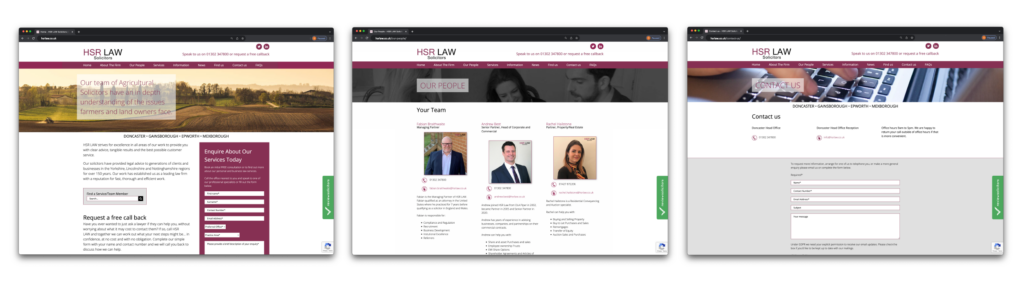
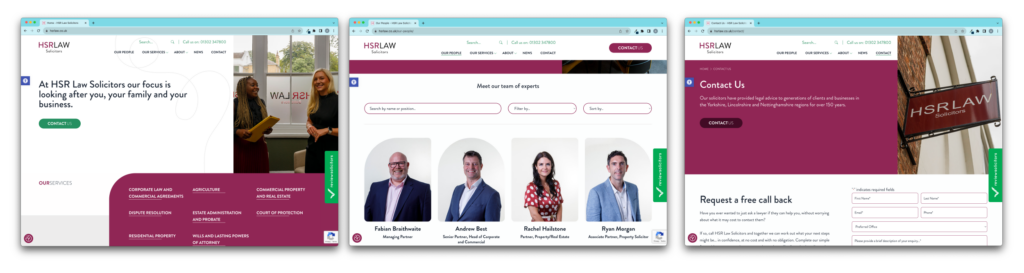
HSR Law’s old website design: lots of box-y shapes and lacking that modern spark. Call-to-actions aren’t clear, the weight of heading text overlaying images is weak and there’s a heavy lean toward an old grey look.

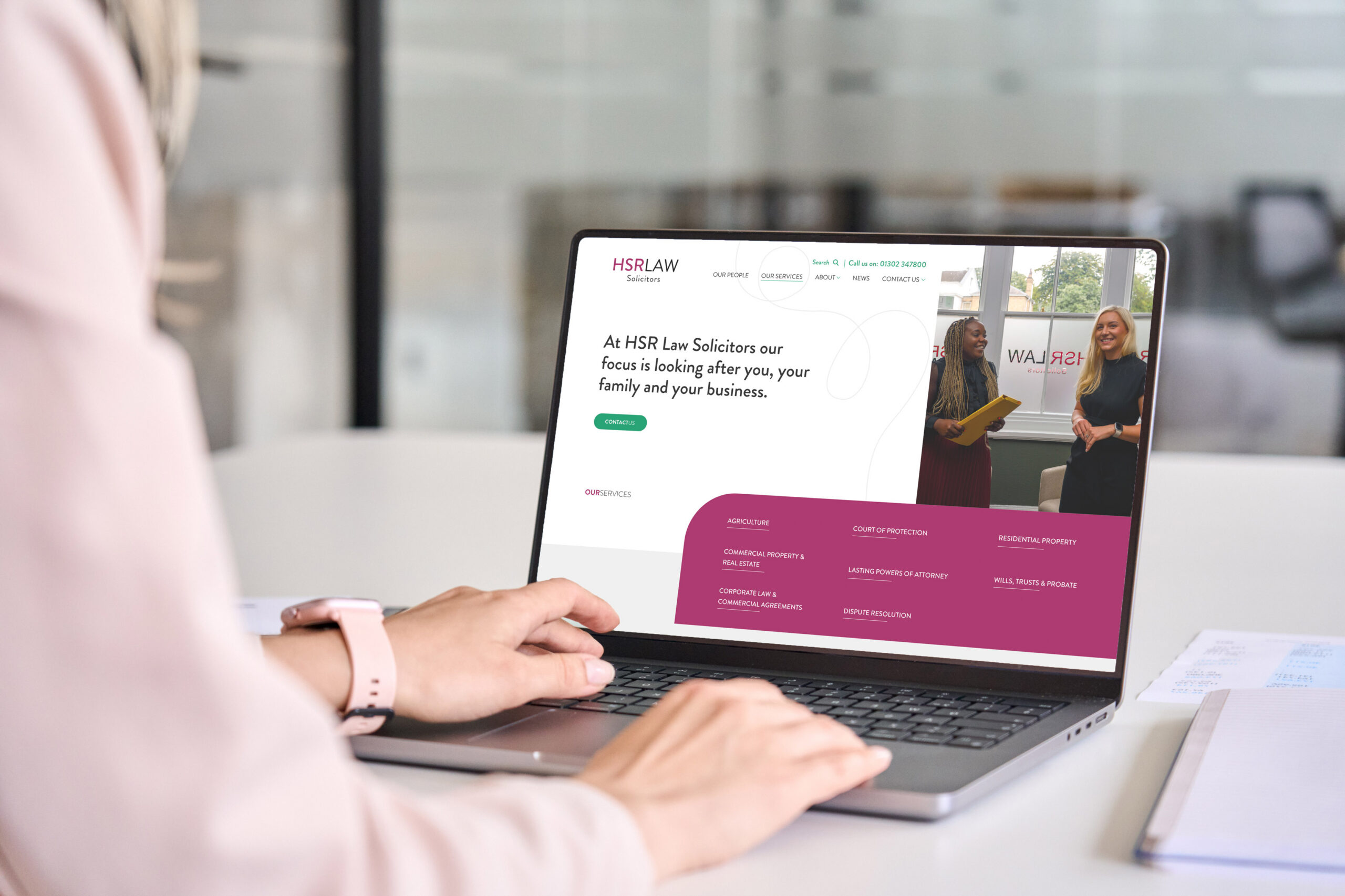
Modern website design:

HSR Law’s new website design: fun new shapes, introducing new colours, clear call-to-action’s, nice typography and use of headings for SEO, clear navigation and a strong focus on their own imagery.

Is my website fast loading?

SlOoooooow websites are the destroyer of client hope. The creator of rage clicks.

Test your website speed using Google’s tool here. Needless to say, if your website is slow, your clients certainly won’t be in how quickly they leave your site and find a competitor with a fast loading time. Your website speed is crucial in creating a good client experience. They want to be able to navigate through your site with ease and quickly. We’re all guilty of re-loading a page again and again when it’s spinning or parts of it are loading in banner-shaped chunks in a painfully sluggish reveal. Slow website speeds contribute towards unhappy website visitors and a high bounce rate. Make sure yours is fast. If it isn’t, you need to fix the problems. If the problems are unfixable and the slow-speed is deeper routed through poor and outdated coding, you may need to consider a new website.

Is my website menu easy to navigate? Is it easy to click through and quickly find what I want?

How many clicks does your client have to go through from opening your menu to getting to where they want? Your navigation menu must be clear and easy to follow. You must have a search bar function so that people can type in keywords and find things that way, but you must also have a clear hierarchy of services. Your menu is so important as this is where clients find all the information they need to instruct you. Ensuring that this menu is also responsive on mobile and just as clear/easy to follow on mobile devices is absolutely essential.

One way to check that your menu structure is clear and simple is to use the following example as a template:

E.g.

Our Services
Parent page: Residential Property (website.co.uk/our-services/residential-property)
Children page: Remortgaging (website.co.uk/our-services/residential-property/remortgaging)

A child page sits under a parent page, and a parent page sits under a main overarching page structure. Does your website follow this structure? Or do you have pages everywhere with no structure to it? See below an example of a website’s structure:

Is the mobile version of my site responsive?

If you’re on a desktop computer right now, load up your website and drag the edge of your browser inwards to see how responsive your website is. Alternatively, get it up on your phone and have a look. Does your menu work as well? Are there certain images that don’t look right or any call-to-actions that overlap your click-to-call buttons? It’s important that your website is user-friendly for desktop and mobile users, because you simply don’t know who is visiting on what device. So, we need to cater for everyone. It’s all good if your website is amazing for desktop-users, but if your Google Analytics shows 74% of your website visitors are mobile users, and you haven’t focused on optimising your site for mobile, it’s not going to work.

This is also a really important metric that Google takes into account when considering the optimisation score of your website and how well optimised it is for search engines and your users.

Does my website use the tone of voice of lawyers or clients?

This is a really tough one. It’s hard to wear the hat of your client when updating your website or adding new content to it. You tend to find yourself using language such as litigation and dispute resolution in the same page without explaining it’s essentially the same thing with minor differences; or contingency fee agreement and damages based agreement work rather than no win no fee.

Does your client know what this means?

Are you speaking to them in a language they understand, or a language that you as a legal professional understand?

I know it’s not always possible to put everything in the language of your clients. Some terminology is just complex by nature. However, your tone of voice should be approachable and friendly, whilst still reflecting the values of your brand. It’s a tricky balance, but with the right help, is definitely achievable.

E.g. You want to get a client to contact you. Which sounds better?

  • If you are looking to instruct a solicitor, contact us today.
  • Looking for a law firm to help you? We’d love to chat.

Option 2 is approachable and less intimidating, but not so informal to the point it hurts your professional brand image. Make sure your tone of voice is right and consistent throughout your entire website. This must also match up with your tone of voice across social media.

Is my site optimised for search engines and SEO friendly?

And last but not least, is your website optimised for search engines and SEO friendly? And most importantly, how do you as a law firm know if your website isn’t SEO friendly, without input from an agency?

Here’s a checklist:

  1. Is your site fast? Test your website speed using Google’s tool here.
  2. Is your site responsive on mobile and tablets?
  3. Are your pages populated with H1, H2, H3 titles?
  4. Do you have internal and external links throughout your website pages?
  5. Do you have an SEO checker on your site such as a Yoast SEO plug-in that shows you what your meta description and SEO title are? (This is very important because your meta description and SEO title determines how you are found on Google).
  6. Are the images on your website optimised for web rather than huge in size? We recommend images being less than 1MB. Anything over can cause serious lag.
  7. What does GTmetrix say about your website? Are you ranking Band A or Band F? GTmetrix tells you how your website performs, why it’s slow, and how to optimise it.

To conclude…

Getting a new website is a big investment. We understand that entirely; hence why we’re here to help you recognise the signs before delving into the world of new websites.

If after reading this article you’re realising your law firm’s website doesn’t comply with the essential audit checklist I’ve provided above, you may want to have a chat with us.

Case Studies

We’ve designed websites for Goodman Ray, HSR Law SolicitorsEdwards Duthie Shamash SolicitorsTV Edwards SolicitorsA&N Care Solicitors and more still in the pipeline. We’ve watched our clients reap the rewards of their new sites because we don’t just focus on creating compelling website designs, we focus on creating a system that alleviates your fee-earners’ time. Just one example being our intelligent automations that dynamically take information from your website enquiry forms, then populate them directly into your Practice & Case Management System (PCMS). With this technology we also digitise conveyancing quotes, Wills questionnaires and much more, all linked directly to your PCMS. 

Accesspoint Blog
7 min read

Emerging trends and innovation: when should you change your PCMS?

Overview

Driven by the desire to help firms with their biggest challenges

As always at Accesspoint, we are driven by the desire to help firms to deal with their biggest challenges, and we covered a lot of this at our 2024 Innovators Forum. We are however constantly being asked by firms about if and when they should change their legacy PCMS. Anything that’s client server based in my opinion is a legacy system. These systems are on the way out, whether the suppliers choose to issue end of life notices or not. The writing is on the wall, as the world moves to cloud-based solutions and services, for the myriad of reasons that are too long to cover in one blog post.

If and when should you change your legacy PCMS?

My opinion is that firms should start to plan for that move away, if they have not done so already. Now, that could be within a few months, it could be within 2 years or even 5 years. But it is an eventuality now and each firm needs to consider their individual circumstances (which is different for all firms) and start to plan appropriately.

What we see from firms moving from one PCMS to another

Through our data migrations team, we get to see the various movements of firms moving from one PCMS system to another; so we can see the trends in real life and get to see how the suppliers are reacting to these movements.

The legal PCMS market is in a state of flux and constant consolidation

This unfortunately means uncertainty for many firms on certain systems. We have recently seen some PCMS suppliers holding a firm’s data to ransom effectively, charging considerable sums of money to access their own data. We have also seen firms coming to the end of their contracts being presented with huge annual increases, and left with only weeks to find a new system and migrate their data, consequently having no choice but to accept.

Plan and move on your own terms

I’m not for one moment suggesting that any other PCMS providers out there are going to do what I’ve mentioned above, but my advice is to plan and move on your own terms. Keep updated on the current market; look at market–leading cloud based systems like Actionstep and NetDocuments at your own leisure, rather than if forced to and at haste. Get a feel for what you would move to and why. There are some firms that review their PCMS every 2-3 years as a matter of routine. Consider being one of them.

So, what is Accesspoint’s position with this backdrop of uncertainty?

We promise our clients to:

  • Support firms on their current systems as some of the suppliers effectively wind down.
  • Continue to innovate and provide practical solutions to plug the gap such as our Mozaique, and bespoke, software solutions and various integrations with innovative 3rd party software. You can’t stand still as a business, just because you are planning to change your PCMS. The firm still needs to compete effectively in their market and provide clients with the best experience in the interim.
  • Stay ahead of the market in terms of assessing and working with the best legal tech solutions in order to guide firms when they are ready to make that move.
  • Help firms to determine the right path for them, whether that is moving to a new PCMS  system now or taking a staged approach such as moving certain components like their document store to a Dedicated Document Management System like NetDocuments or implementing Specialist Solutions like Ochresoft’s Intelliworks Workflows, first.
  • Gear up our implementation services to be ready for firms as and when the time is right for them to move to a new PCMS. We are in a great position to help with these implementations as we have great knowledge of both the outgoing and incoming systems and with many of our clients, also an understanding of the firm itself and the different teams within the firms.
  • Continue to develop our agnostic solutions such as Mozaique so that they can integrate with the firm’s future tech stack. So, for firms that have already implemented Mozaique, we would look to integrate that with their next PCMS systems and indeed a Mozaique integration with Actionstep is due for release in early 2025.

Our relationship with clients is more important than just pushing products and services

I like to think that at Accesspoint, we place more importance in the relationships with clients than just about pushing products and services. We have a genuine desire to support and guide our clients through the myriad of legal tech solutions and to give them and their users the right solutions that can genuinely make a difference to theirs and their firm’s success.

I believe that if you can get that right, then the commercial success will always naturally flow from there. It also makes working with clients and on projects a bit more enjoyable and as you all know, at Accesspoint, we do like to have a bit of fun along the way!

An e-booklet by Richard Higgs.

Accesspoint Innovators Forum
6 min read

From Then to Now: A Year of Progress and Innovation

Overview

Unveiling Our Journey Since Last Year’s Conference 

Accesspoint’s year end was just last month and last year was certainly the biggest year for us in our company history with significant gains in every area of the business:

Our latest success stories

Our Mozaique products continue to grow in demand

Demand for our Mozaique suite of products remains strong and we were pleased to roll this out to firms such as LCF Law, Hunt and Coombs, Osbornes Law, Maurice Turnor Gardner, Kingsfords, Lacey’s, Best Solicitors, Herrington Carmichael and more. This has led to firms wanting to push the product even further. We do our best to listen and we have released some major enhancements to Mozaique which we’ll be able to detail later on in the conference.

We’re working on new websites and digital marketing plans

Our marketing and media team have also grown with development of new websites and digital marketing plans for firms such as HSR Law, Goodman Ray & Thornton Jones with Sternberg Reed, GT Stewart and Prince Evans soon to follow suit.

Training and Consultancy booms

We trained over 2,000 users over the past 12 months from the various new PCMS and DMS implementations as well our New Starter Training which is proving ever more popular. We continue to support firms with consultancy services including report writing, case management workflow development, setting up modules and processes. Still very much bread and butter services for us.

Having said that, we have become more and more agnostic as a provider and have also partnered with other PCMS Suppliers such as SOS, LEAP and Access Legal to build various integrations.

We’ve built solid partnerships

We’ve built and nurtured solid partnerships with leading Legal Tech providers such as NetDocuments, Actionstep, Verify365, PALI, Ochresoft, ReviewSolicitors and FormEvo. Developing very successful integrations that they had previously struggled to achieve.

We continue to invest in UK-based talent

We continue to provide opportunities to young people starting out in their IT careers through our Apprenticeship program. Many of the talented developers and consultants that you have worked with at Accesspoint started out with us as Apprentices including Nesar, Joni, Jamie H and Jamie C and our very popular Mr. Matthew Smith.

Others who joined us still early in their careers such as the fantastic Jack Gilham there, have really started to find their place in the business with Jack now leading our NetDocuments implementations after joining as a Developer only 3 years ago.

We’re always on the look out for specialist Legal Tech talent

We are also always on the look out for specialist talent in the Legal Tech arena as they are always worth their weight in gold. So we were very, very pleased to recruit two key hires in the past few months: Kirran Tariq who some of you may know from her time at Advanced working in the implementations team concentrating on Case Manager training and development as well as Crystal Reports and TaskCentre. She came to us from having recently been at Linetime implementing this and other products such as PracticeEvolve. Hayley Biddlecome then joined us in May. She brings a wealth of knowledge around PCMS systems with a particular skillset in Accounts and Legal Aid, which are very hard to come by these days.

We’ve had a busy year!

So, we have had a very busy year at Accesspoint. And here are just some of the new clients that we signed up this year. A great result.

The one that really stands out is the Team GB logo. This was a really cool project that Scott won through his industry contacts and involved us completely digitising a large stream of their manual processes by developing a bespoke portal and Mobile App for the Paralympic athletes which allows them to select, administer and track their equipment. As you can imagine, there are thousands of athletes and supporting staff with huge warehouses full of equipment that needed to be moved around the world. So it was amazing that we got to be a part of that, and really shows off the diverse skillsets that we have in this business.

Thank you!

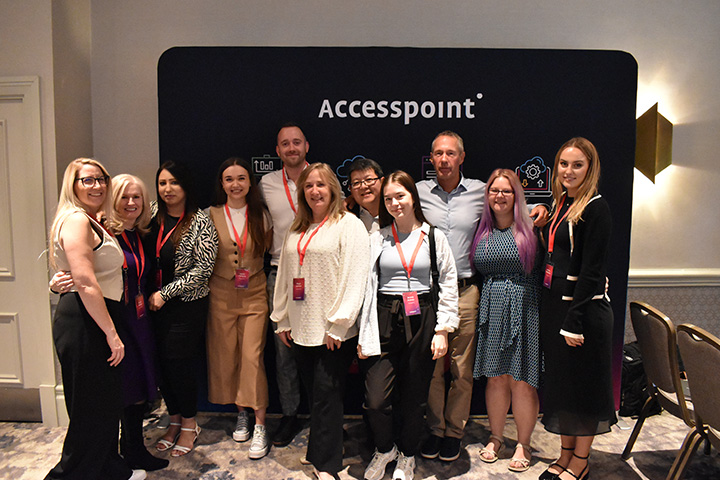
A huge thank you to everyone that attended our event in helping us to get here.

You’ve all had a hand to play in creating this forward thinking, innovative and fun business that is Accesspoint.

Accesspoint Innovators Forum
Digital Marketing
8 min read

Q&A with our Digital Marketing Lead, Olivia, and the SEO results for HSR Law Solicitors

Overview

Keywords, impressions and clicks, oh my!

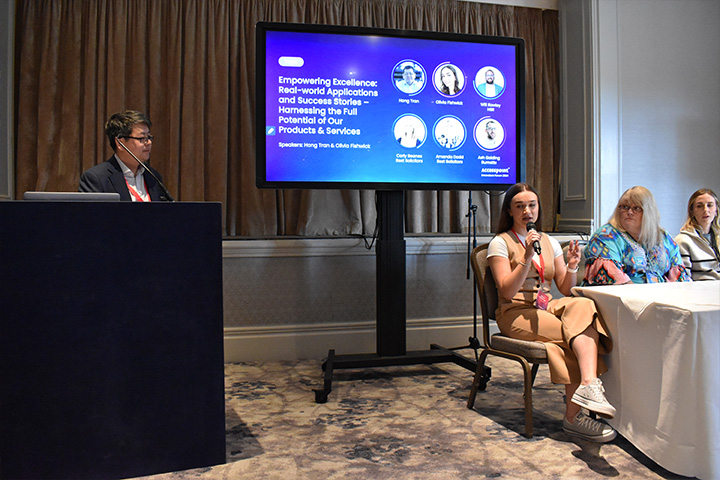
At this year’s Accesspoint Innovators Forum, we hosted our popular fire-side chat with clients from Best Solicitors, Burnetts and HSR Law Solicitors. Unfortunately due to unforeseen circumstances, Will Rowley (Practice Manager at HSR Law) couldn’t attend and so we placed Olivia on the panel to talk through the work she and Will have been doing together and the latest results from the new landing pages.

Original objectives were quite simple: heavy focus on original imagery, not stock imagery. Improve and modernise the brand across the website and subsequently use this new branding to establish a strong social media presence with the strategy of driving all traffic back to the website. HSR also wanted to improve web enquiry forms to seamlessly link client submissions directly to their PCMS. We did all this through the launch and then with the digital marketing and SEO work we do, this allowed us to work through the objectives of a better social strategy and an increase of website traffic.

So within a month of launch the google impressions increased by 4000. Just to put into perspective, an impression is when somebody sees you on the Google Search Results Page (SERP). This isn’t a click. It’s a reflection of visibility and how often you are seen across Google. Contact form completions increased by 38% and we saw an 164% increase in organic users. Just to put this into perspective because I know percentages can sometimes be a bit ambiguous: In the 3 month period of June – August last year, HSR’s website generated 94,000 organic google impressions. In that same period this year, that hit 194,000. That’s a 100,000 increase. It’s massive what the new site and SEO work has done for them.

When HSR instructed us to create a new site with them last year and also signed up for an SEO and Digital Marketing contract, the first thing I said to Will is that your website is quite small and has so many opportunities to be bigger and increase visibility: more pages = more indexability on Google.

There wasn’t a lot of content, bar landing pages for the main services such as Residential, Probate, Agriculture, Commercial; with a bullet-pointed list of sub-services. I said to Will the first thing we need to do is set up monthly meetings and identify the different departments to target and expand on the site. In February after Wills & Probate focus, we focused on Residential. We went from 1 residential page on the site to 1 parent and 12 children pages for all the sub-services, and then worked on FAQs and adding relevant accreditations such as CQS to the pages. We now have 8 number 1 positions on Google for residential property key-terms and 13 in the top 3. Some of these being auction solicitors, buy-to-let solicitors, right-to-buy, new build, transfer of equity – you can see how much visibility on google we’ve achieved from simply focusing on expanding content and optimising it for the search engine. Without those pages, we’d be missing out on all those keyword opportunities. And Will said in our last call how ridiculously busy the online enquiries are for residential now, which in turn contributed toward the decision in the conveyancing tool.

Firstly, it needs to be modern. Does it look like it belongs in 2024? And is your imagery strong? People do shop with their eyes and the first impression when they land on your website is absolutely vital.

You also need to check if your website is quick. You can test it on Google’s Speed Test. Because a slow website infuriates customers and all they’ll do is get rage-clicks, feel annoyed and consequently leave your site; seeking out a competitor. We want to keep your customers happy and provide them with a good experience which encourages them to stay. This leads me into the navigation: can you find what you’re looking for on your site? The menu needs to be simple and easy to navigate through, or again, you’ll see a high bounce rate and lack of engagement.

Lastly, your website needs to have consistent call-to-actions (CTAs). We like to design our CTAs in a different colour (usually a secondary colour) so that it stands out against the primary colour palette used across the website branding. Click-to-call and bespoke contact forms should be strategically placed around your site so that visitors can easily convert at any point in their journey. This for me is the foundation of a great website.

In terms of capitalising off it, our dev team then have the skills to create cool integrations such as web enquiries seamlessly landing in your PCMS as a lead, and more. We also create all our websites bespoke and custom-built, using WordPress, so that it removes the costly intervention of third-party agencies who create the back-end of their websites so that you have to pay every time you want something changing. We remove all of that. WordPress is flexible and easy to use, and you’ll be able to figure it out with no cost involved.

News
5 min read

Accesspoint Legal Services Announces Major Milestones and Achievements

Overview

Our Major Milestones and Achievements

July 18, 2024 – London, UK – Accesspoint Legal Services, a leading provider of legal technology solutions, is thrilled to announce a series of significant milestones and achievements, underscoring the company’s commitment to excellence and innovation in the legal tech industry.

June 2024 marked a major milestone in our company’s history.

This remarkable achievement is a testament to the hard work and dedication of our UK based team, and the growing demand for our innovative legal technology solutions.

4 long-term Development as a Service (DaaS) contracts secured

We have secured 4 long-term Development as a Service (DaaS) contracts, reflecting our clients’ trust in our ability to deliver continuous development and support tailored to their evolving needs. Our DaaS solution helps clients develop and streamline their processes, at a fraction of the cost of hiring an internal developer.

Welcoming new members

We are pleased to welcome two new members to our team, whose expertise and enthusiasm will further strengthen our capabilities and drive our mission to provide outstanding service to our clients. Kirran Tariq joins us to deliver Actionstep & NetDocuments implementations whilst Hayley Biddlecombe brings her extensive experience of legal accounts to add to the consultancy services we offer.

Actionstep Gold Partners

We’re delighted to have been promoted to Gold Partner status with Actionstep, a leading cloud-based practice management software provider. This prestigious recognition highlights our exceptional implementation services and ongoing support for our clients using Actionstep’s powerful solutions. Accesspoint provide the full implementation, from data migration through to setup, workflow creation & user training.

Mozaique

Three more firms have gone live with our Mozaique platform this month, which will streamline the day to day tasks for 500 more Lawyers. As more and more clients look to bring disparate legaltech solutions together and streamline inefficient processes into a single intuitive portal, the interest in and take-up of Mozaique is seeing a corresponding increase.

NetDocuments

We are currently undertaking our largest NetDocuments data migration project to date. This ambitious project showcases our technical expertise and commitment to handling complex data transitions seamlessly and securely. Our full ‘Platinum Certified’ NetDocuments department provide the full end-to-end migration, setup, implementation, training and support of the NetDocuments platform.

Websites & Marketing

Accesspoint have worked hard on designing, developing and deploying three brand new websites & digital marketing strategies this month for firms across the UK. They are all now benefitting from higher quality traffic and increased volume of new private client prospect enquiries.

New integrations

Accesspoint Legal Services is excited to be working on three new legal tech partner integrations. These collaborations will enable us to offer even more comprehensive and cutting-edge solutions to our clients and those of our partners.

Commenting on the company’s recent successes, Scott Brown, Managing Director of Accesspoint Legal Services, said:

We are immensely proud of these accomplishments and the increased diversification of the solutions and services which our company offers. Our team’s dedication and the trust our clients place in us are the driving forces behind our success. We look forward to continuing to lead the way in legal technology innovation.

Scott Brown, Managing Director of Accesspoint Legal Services

Accesspoint Legal Services is a premier provider of innovative legal technology solutions. We specialise in delivering tailored services that enhance efficiency, productivity, and profitability for legal practices. Our comprehensive suite of offerings includes practice management software implementation, data migration, development as a service, website development, digital marketing and strategic technology partnerships.

Digital Marketing
13 min read

The good, the bad and the ugly of Google Reviews: how to deal with negative online reviews

Overview

Don’t you just love that warm fuzzy feeling you get when a client makes the effort to go online and leave a shining 5* Google review of your service, how you acted and the lengths you went to when instructed? It’s a very rewarding feeling. Not just for you, but also for your company’s online reputation: the rating out of 5 increases, your recent review is stamped with five gold stars of approval. And did you know 88% of people check reviews here before instructing a firm?

Google Reviews is the most common site looked at, with 88% of people checking for reviews here. Just over half look at Facebook and around a third check ReviewSolicitors or Trustpilot. The main reasons cited for doing this is to identify areas for improvement and identify good performance.

sra.org.uk

Google Reviews act as a hub for current clients and past clients to share their experience with you (publicly) to inform other potential clients browsing the internet for a solicitor just how good (or bad) they believe you are. They’re an excellent golden nugget of user-generated content that can be repurposed in the following ways:

  • Add to your website under a testimonials tab, creating an internal link to the department mentioned in the review and the solicitor (if applicable).
  • Add the review to the specific solicitor’s online profile to strengthen their profile and show to potential clients exactly what past clients think. In our 2023 and 2024 bespoke client website reports, the ‘Our People’ pages of a law firm website are the second most viewed and most popular pages across the entire site. Make sure your profile is optimised to really back up what you specialise in!
  • Turn the review into social media posts linking to the solicitor’s LinkedIn profile and increasing your visibility and credibility across socials.

You know how good you are at what you do, but nothing will truly communicate your perceived worth with as much impact as the paying customer’s feedback. Encourage clients to leave Google reviews by linking them to your Google My Business page once you’ve closed their case. You can also add this step to the bottom of closing letters to create a less admin-heavy task in collating reviews.

Consumers rely heavily on Google reviews to make informed purchasing decisions, and it’s a critical step in the decision-making process for our online clients. So the more good reviews you receive, the better your online reputation and the more sway you have over clients shopping around online. But what happens when you get a bad review?

Many law firms I speak to fear that replying to unhappy customers online opens a dialogue which could get ugly. To clarify, once a customer leaves a Google review and you reply, they cannot respond again.

The bad Google reviews are just as important as the good. That’s because of a phrase I love to talk about called social listening. Social listening is basically where people float around your social media or your online reviews, looking and observing, but never actually engaging up until the point where they decide to instruct you based off their online observations. These are the people you’re appealing to when dealing with a negative review.

Here’s how you need to deal with your negative reviews. You probably won’t like the idea of it at initial glance, but at the end of this article, if you understand why it’s so important to do what I’ve detailed below, then this post has served its purpose!

If you don’t reply to a negative review, you’ve lost out on a huge chance to show any social listeners that you care, that you take feedback seriously and that you wish to sort the matter.

Alternatively, it’s a chance to put fake reviewers in their place and politely inform them that you have no record of them on your database or you have never had a client of their name. This shows to any social listeners you believe this review isn’t real without accusing the reviewer that they are fake. And people aren’t stupid: every single business out there will have had an unhappy customer. It’s a part of being a business. And to try and erase that is to erase transparency which is what Google sets out to do in the first place with its review system. It’s a shame when you receive fake reviews where people can attack you online in attempt to damage your reputation, but you can’t allow this to define who you are and what you do.

The social listeners and the potential future customers reading your reviews are smart enough to draw their own conclusion on the matter. But that’s why it is SO important to reply. That’s your opportunity to fight your corner, so that to any prospects reading the review, you’ve lay out your response right there: not just for the reviewer, but also for those future clients who may be looking.

These are the people championing your business. It’s so easy to get sucked into the black hole of negativity when trying to sort a bad online review, but a simple Thank you so much [insert name]! will suffice when acknowledging clients that have taken time to leave a nice review for you.

Many of our clients have been approached by ‘online reputation management’ companies that claim they can remove your Google reviews, which is a rather tempting invitation when you’re biting your nails down to the cuticle over a review slandering the firm. But did you know it’s physically impossible to remove specific reviews unless they violate Google’s policies? These companies forget to inform you in their initial pitch that to remove said negative review, they purge your entire Google listing so you can start again on a blank canvas. This consequently does more damage than good. You go from having a mix of (majority) 5 star and (some) 3 and 1 star reviews, to none at all. Your trust is gone, future clients will be sceptical as to why you have no reviews, and to omit the bad, you’re erasing all the good.

It’s easy to recognise what kind of reviews violate google’s policies which you can see here. For example:

Review example 1

[Insert name] is ugly and I really didn’t like them. Stay away from [insert name]!!!

This review would violate harassment, offensive content, and possibly even fake engagement as it has no relation to an experience with the business.

Review example 2

*A customer leaves a 1-star review with no reasoning why.

This review would violate fake engagement because it has no comment about the business or the experience and so provides no value to prospects.

This can be really difficult to succeed in for law firms. For example, if a fake client leaves a review listing their awful experience with you, you cannot prove to Google that this is a fake review or misinformation. It’s a case of he-said-she-said and it’s so frustrating for law firms especially when it’s not a truthful review.

There is another more extreme step you can take after reporting, which is appealing a decision Google has made. If Google decides a review doesn’t violate a policy, you can appeal this by filling in an online form to Google, telling them why you believe a review violates their policies. However, this also isn’t guaranteed. We’ve seen cases of firms going through the entire appeal process, just for Google to stamp a big fat cross over it. What we can guarantee though is your consistency in responding to reviews and taking charge of managing your firm’s online reputation by replying to the good, the bad and the ugly side of Google reviews. You never know who’s watching. You never know how impactful your response could be in the decision-making process of any social listeners loitering on your digital profiles.

  • Encourage google reviews by sending the link to clients once a case is closed, or adding the link to closing letters.
  • Don’t ignore ANYONE. Thank your cheerleaders and then fight your corner in the politest way to anyone trying to damage your online reputation. Try and fix it. Reach out to the client. Openly leave your contact details on the review to show that you want to sort this issue.
  • Report any reviews that violate guidelines. If members of your staff are being personally attacked or a 1-star review is left with no additional comments, these should be easily removed under grounds of harassment or lack of information.
  • Treat your reviews like a thousand people are judging you. Always reply politely, but in a way that gets your point across to the reviewer and the social listener that you believe the review is either fake, or you are deeply sorry for their bad experience and wish to resolve it.

You can manage your online reputation with honesty and transparency. Replying to reviews shows you care, ignoring them can communicate you’re not bothered, and trying to get them removed is a whole different level. Trust in your future clients to make their own judgement about you based off your online reviews, but definitely try and help them in that judgement along the way by responding to your Google reviews: the good, the bad and the ugly!

If you want to discuss digital marketing or anything discussed in this blog, email me at olivia.fishwick@theaccesspoint.ltd.

News
4 min read

Accesspoint and FormEvo Partnership

Overview

Accesspoint partner with FormEvo

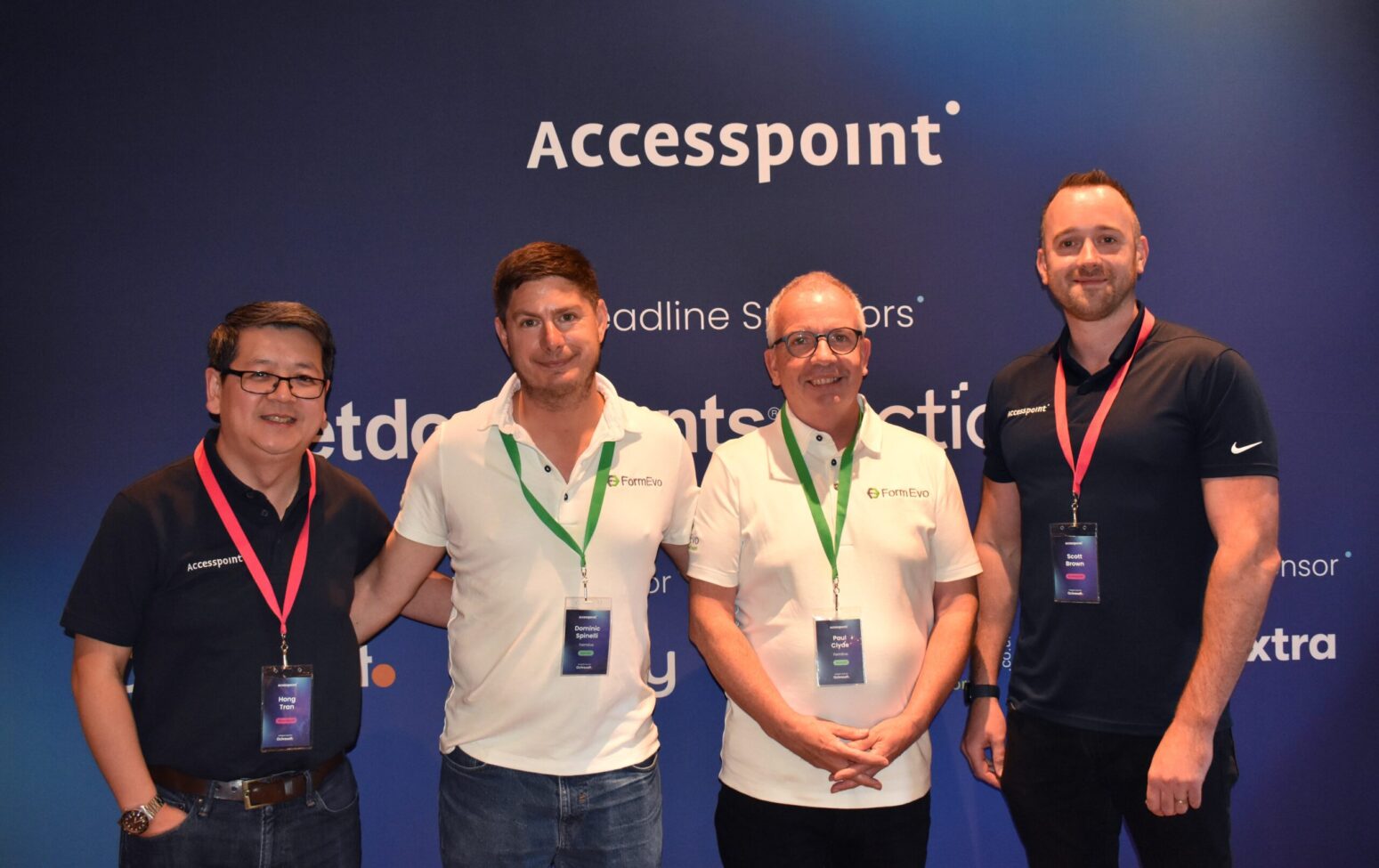
Accesspoint Legal are pleased to announce a new partnership with leading cloud-based Legal Forms provider, FormEvo.

Accesspoint will also be working on a number of PCMS Integrations for FormEvo. We believe that a detailed integration with the PCMS system is a key time saving feature that also helps to reduce data entry errors. An integration with Accesspoint’s own Mozaique Legal Portal is planned for the Autumn of this year.

Many of Accesspoint’s Law firm clients have often enquired about cloud-based alternatives to the traditional on-premise legal forms, with the key benefits of FormEvo’s cloud-based offering being:

  • Full-Service library containing both electronic and digital forms. The direction of travel is more digital forms which on premise cannot provide.
  • Collaboration opportunities internally with the ability to share access and set up management control in the form completion journey.
  • Collaborate directly with clients by sharing access to forms with various levels of editorial control for home completion and then e-Sign.
  • Automatic updating of the forms library and the release of new security and functionality upgrades.
  • Extensive integration capabilities with CMS and DMS applications with constant reviews and updating of integration tools such as the API. On premise applications have the greater risk of falling behind on security requirements and elements of their applications tech stack becoming unsupported.

TA Forms Announcement

FormEvo announced the release of new editions of the Law Society’s Transaction (TA) forms 6 (5th edition) and 7 (4th edition) on the 25th of March. As many law firms are aware, there is now a transitional period until the 25th of June where the previous editions of these forms can still be used but they will then be removed, and existing draft forms will no longer be usable. FormEvo advise firms to start using the new forms immediately to avoid the risk of having to re-start the form completion process.

The new TA6 form is made up of two parts; with part 1 making up the material information required by Estate Agents to market the property. It is worth highlighting that failure to meet the material requirement is a criminal offence; so sellers may well require additional support from their legal advisors.

Some of the questions previously within the TA7 Leasehold information have been added to the new TA6. These forms are part of FormEvo’s comprehensive range of property-based forms with automatic updating of any further form changes.

FormEvo allows users to share the TA forms with both the seller (for completion at home) and the relevant estate agents, and can be e-Signed. Extensive guidance notes are included.

Please contact hong.tran@theaccesspoint.ltd for further information.
Digital Marketing
11 min read

Utilising LinkedIn as a lawyer who’s unsure where to begin

Overview

Your future clients are right in front of you. Let’s get them!

Behind our professions on LinkedIn, behind every CEO, Executive, Associate, Consultant and Assistant, there’s a person who is living life: A person who’s in a relationship or their relationship has just broken down and they’re currently stressing over child arrangements. A person who’s beginning to recognise that those offensive jokes their manager has been making at work for the past few months is actually bullying. A person who’s about to climb the property ladder for the first time or sell their first home to move to another.

What I’m getting at is that just because you’re on a platform for professionals, doesn’t mean those professionals aren’t going through things that require the help of a solicitor.

Your clients are people: CEO’s, Execs and Juniors going through very human experiences outside of work.

To help you utilise LinkedIn in the best way for your audience, we need to go back to basics. I’m going to share with you the difference between your company’s account and your account, setting up your profile correctly, how often to post and what types of things to post, and why you should be doing this.

The company account versus your account

The difference between your company account and your personal account is that the former is used for updates and news about the business; and the latter is used for you to be an advocate for the company you’re employed at, but also for you to be completely human about who you are.

Your company’s page is where the brand is focal: your house style, your brand colours, your font, your tone of voice. Everything here advocates the brand. Your company account (usually run by my team if you’re an Accesspoint client or your chosen digital marketing provider) follows a specific tone of voice and a planned strategy with goals such as all call-to-action’s focusing on driving more traffic to the website. Your personal profile, however, is you. It’s a humanised, approachable extension of the brand that shows off exactly who the people are that make up the brand they trust.

People buy from people, is our motto for law firm marketing

If you’re one of our clients, you know we love a humanised touch in a law firm’s online strategy. We like to focus on the people behind the brand, as a law firm would be nothing without its solicitors. That’s why we encourage you to use your own profile, but is it set up correctly?

Setting up your LinkedIn profile: a lawyer’s checklist

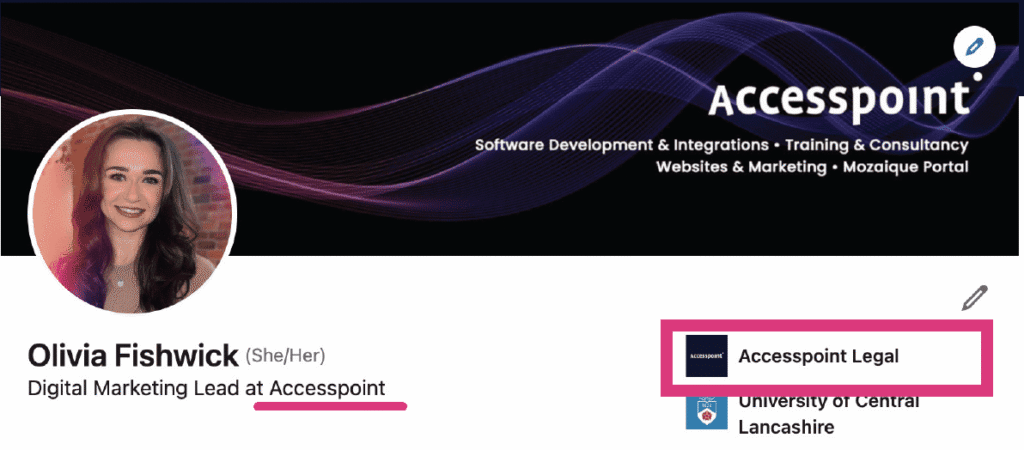
If your LinkedIn is set up correctly, the company page logo and name will appear as shown in the screenshot below. The text beneath your name should also have the keyword of your company name in. If this is the case for you, then perfect! If not, keep reading. This is important because if you don’t have this set up correctly, you won’t even show as an employee of your company page.

profile set up

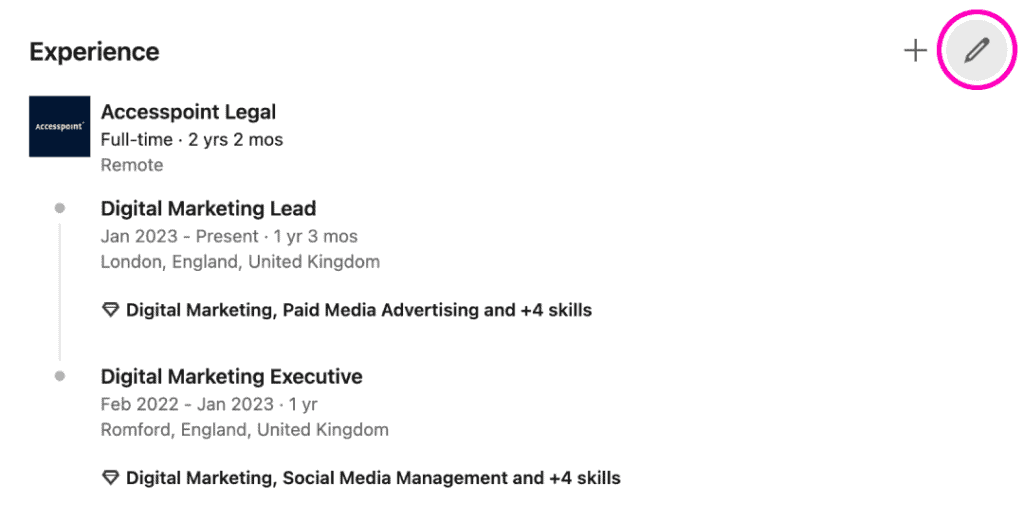
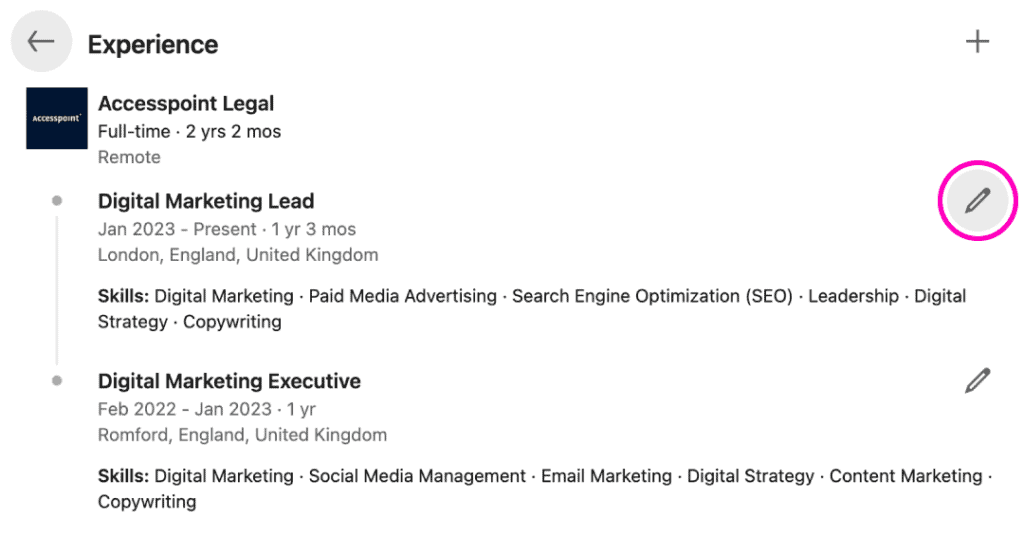
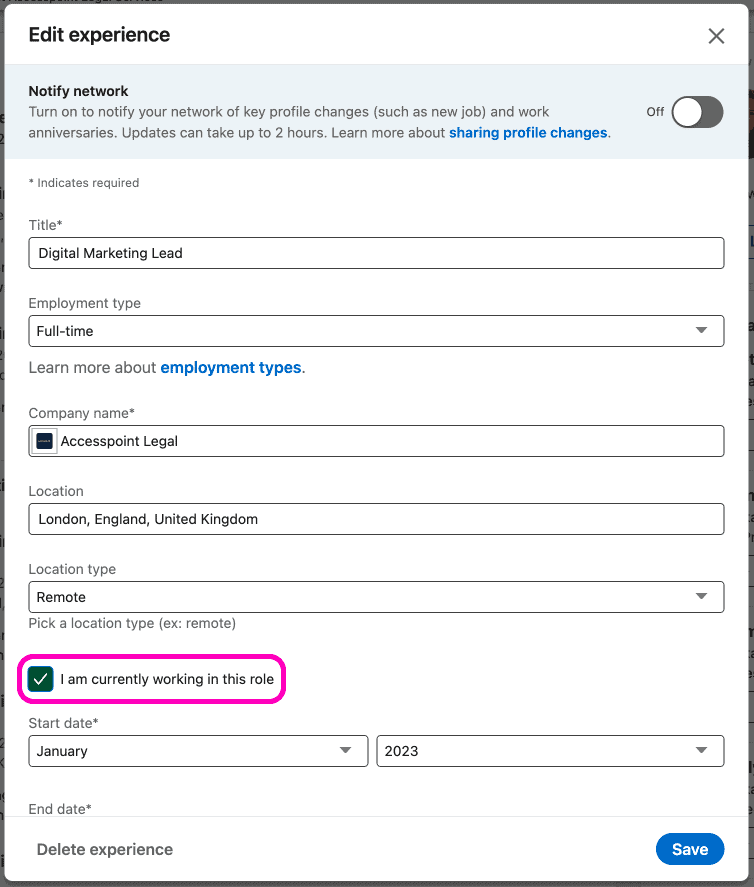
Scroll down to your experience and click the pen tool (edit). This then makes your experiences editable. Click the pen tool next to your current role.

linkedin example how to edit experience
  1. In the edit experience box shown, click into the company name field and begin typing your company name.
  2. Make sure you click your company page with your logo on it.
  3. Click Save.
  4. This change will prompt you to update your headline as long as you have the I am currently working in this role box ticked. If it does prompt you to update your headline, click yes.
  5. Scroll down to your experience and click the pen tool (edit). This then makes your experiences editable. Click the pen tool next to your current role.
linkedin example how to edit experience

How often to post and what types of posts

You can post whenever you want and whenever you feel like it. You’re an advocate and aren’t restricted to how often you wish to post. However, if you need some guidance, we recommend posting a minimum of three times a week to your audience. This can include resharing posts from your company account and creating your own posts. If you are going to re-share posts, make sure you follow the below advice:

Repost with thoughts, don’t just repost

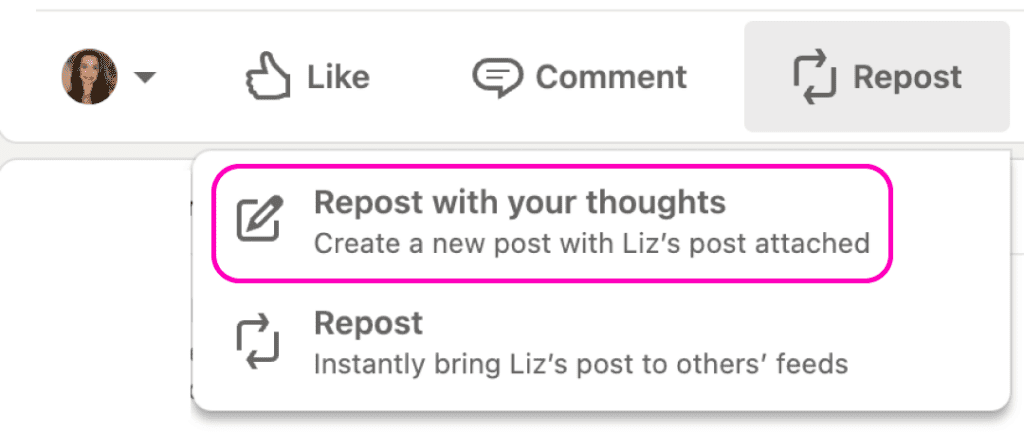
When you go to interact with a post, you always see this bar beneath it. What you need to do here is click the Repost button, which gives you two options: repost or repost with thoughts.

This then allows you to repost your company’s LinkedIn post, but add your own comment to it for your network: repost with your thoughts.

repost with comments on LInkedin

We recommend reposting with comments such as:

  • Check out our most recent post/blog post/case/testimonial.
  • If you’re looking for more information on … pop me an email or give me a call (insert contact details). I’m here to help.

These personalised touches humanise yourself and make you more approachable. Speak to your audience in your voice. The company page is your company’s corporate voice that has been decided upon crafting the strategy of the company social media pages, but your personal LinkedIn page is YOU and should reflect that.

Once you’ve written your own message, click post.

Why do I even need to post?

It’s true, you could just leave your company page to generate the brand awareness, but when it comes down to it, your clients will be dealing with you who is a representative of the company. They associate you with all the qualities and goodness that your company page has shared on LinkedIn, but you are your own person, with your own talents and abilities, and you should rave about that.

Trust

Posting on your own account builds trust. People become more wary seeing posts from pages with logos as profile pictures. They like faces and they like people. Build that trust with your audience and humanise yourself. Tell them what you’ve been up to recently: any accreditations / training courses you’ve recently participated in or successful cases that you are proud of. Have you recently achieved something outside of work that provides your audience with a small insight into who you are and what you value? Have you introduced yourself as a person to your audience? All of this builds trust!

Visibility of you as a solicitor

When you post, and anyone in your network likes or comments, everyone in their network will see your post. Importantly, this links back to my first point in this blog: you don’t know who out there (exec or CEO) is going through something that could require your expertise. That’s why becoming visible is so important, and that’s done through posting.

Word of Mouth Marketing (WOM)

This reason for posting is similar to the above. WOM remains one of the most effective (and free) marketing communications that you can utilise. If you give people interesting content to talk about, they will. That’s why it’s important to share your achievements and share what you’ve been up to. I know it’s time consuming, but the more you engage with your network, the more your name will be at front-of-mind, and the more likely you will be recommended to family and friends of those within your network. It’s a good idea to always ask your clients when opening a new case where they heard about you, so you can track the source of instruction and log this in your PCMS.
To Conclude…

LinkedIn is a fabulous tool for networking and getting your message out to a wider audience. It’s just important to make sure your profile is set up in the most effective way and you know how to use your account to its optimal when trying to engage potential clients and make yourself known.

Push past the fear of caring about what other people think about you when you’re posting. I have spoken to a few solicitors that have this fear. Once you start utilising your personal account to reach those future clients that are right in front of you, you’ll be unstoppable!

If you want to discuss digital marketing or anything discussed in this blog, email me at olivia.fishwick@theaccesspoint.ltd.

News
1 min read

Accesspoint Technologies acquired by iomart Group PLC

Overview

Last week on Tuesday 5th December, our sister company Accesspoint Technologies Ltd was acquired by iomart Group PLC. As you may or may not be aware, Accesspoint Technologies is the business that provides Hosting, IT support, Cybersecurity services and more to the Legal Sector and this will still continue with business as usual under the new ownership.

We would now like to reassure you that Accesspoint Legal Services Limited is completely unaffected by this transaction and is not part of this acquisition. Accesspoint Legal Services provides PCMS support, Software Development, Websites, Digital Marketing; Training & Consultancy, and business will be continuing as normal.

We would like to take the opportunity to thank all of our clients and look forward to continuing our working relationship into the future.

Testimonials

Don't just take our word for it...

Working with Nesar has been a positive experience for our website. His technical expertise, proactive approach and attention to detail ensure that our site runs smoothly at all times. He is always quick to resolve issues, implement improvements, and offer practical solutions that enhance user experience. Nesar is a pleasure to work with, and I am impressed with his communication and client service skills.

Hayley Leslie, TV Edwards

Working with Accesspoint’s website team was reassuring and easy. They kept us updated with everything that was going on from start to finish. We’re very happy with the new website. It’s clean, refreshing, and provides a great user experience with its fast speed and easy navigation.

William Rowley, HSR Law Solicitors

We’ve been really impressed with Accesspoint and Rich’s SEO support. Rich is extremely proactive in suggesting and carrying out work that genuinely helps improve our rankings, and he’s always there whenever we need advice or support. We’ve already seen great results from the work they’ve done, and it’s reassuring to know our SEO is in such capable hands. Highly recommended.

Molly Thornton, Thornton Jones Solicitors

I’ve really enjoyed working with Rich and have seen first-hand the positive impact he has had on our website. His in-depth knowledge of SEO is inspiring, and I’ve learned so much from him through our email exchanges alone! Anyone who works with Rich will gain valuable knowledge that they can then carry forward. Thank you Rich for all your hard work and support.

Paaris Kazmi, GT Stewart Solicitors

Working with Accesspoint has been an absolute pleasure. Their passion for what they do and supporting their clients is clear in every interaction. Scott, Olivia, Rich, and others are consistently approachable, and willing to go the extra mile. Our project with them was complex and highly bespoke, yet they rose to the challenge effortlessly. Thanks to them, our website and brand has seen a significant increase in visibility, engagement, and traction.

Brett Shaw, Chronicle Law

Rich has been absolutely fantastic in helping us improve our SEO efforts. He has always been proactive in optimising our pages and ensuring they perform the way we need them to. He has been great at offering valuable guidance on how to strengthen our rankings and his monthly reports have been elaborate and really useful. I’ve very rarely had to reach out to Rich. He has always actively suggested improvements and identified opportunities to ensure we stay on track.

Paaris Kazmi, GT Stewart Solicitors

The warmth and generosity of the Accesspoint team is amazing – you are a lovely bunch of people and a real pleasure to work with.

Rebecca Faulkner, Enoch Evans

Our website looks really fantastic! Well done to all of you!

We are so happy with all the social media on Goodman Ray! It’s so exciting every time I see something on there. Olivia and Emma are doing a great job and make everything so easy!

Louise Payne, Practice Manager at Goodman Ray Solicitors

I love working with Accesspoint because they are always available to help with any query big or small and have the expertise to ensure the issue is sorted.

Clifton Ingram Solicitors

What we love most about Accesspoint are the people.

Tracey Thorpe, Hunt & Coombs

Accesspoint have been so incredibly supportive in achieving desired objectives – including creation of platforms, website design and lead generation. Big thanks in particular to Olivia Fishwick and Scott Brown who continue to help make a difference for the business.

Thushara Polpitiye, Founder and Managing Director of Astute Law

Book a demo

This field is for validation purposes and should be left unchanged.