
Higgsy's Handy Hints
10 min read

What The F?! A Guide To The F Key Shortcuts in P4W

Overview

What’s this all about then? 

P4W has been around since 1998. In fact, many of you may remember us celebrating P4W’s 21st birthday at the last Tikit NUG in 2019. In that time, a huge amount of functionality has been added and a lot has been forgotten about along the way.  

For firms newer to P4W, they will probably be unaware of numerous functions that can make a significant difference to the user experience whilst shaving off valuable time in getting to the information or functionality needed.  

Having worked with P4W for 20 years and always sought the best way to demonstrate its functionality, it’s fair to say, I’ve probably got as good an understanding of it as anyone else out there; especially from a best use case perspective. 

It was during a lunchtime conversation at the recent Accesspoint Innovators Forum that it became clear to me that even some of those firms who have been using P4W for most of its life were still unaware of some simple, but highly-effective functionality available as standard. As a result, we thought that it would be really helpful to the P4W community if we provided a series of short articles on how to make the software easier to use and Higgsy’s Handy Hints is the result! 

So, let’s kick off with some quick wins to get us going…

What The F?!

  • F2: If you enter part of the client code into the relevant field when accessing a client record throughout P4W, F2 will list all the clients with codes starting with the letter or letter sequence you have entered from which you can then click on the appropriate client to fill in their details. (Please note that this only works with alpha-numeric client codes.) F2 will also display the live matters for an entity in Case Manager and on the Manual Timesheet once you’ve entered the entity code.
  • F3: This function key offers different outcomes depending upon where you are in P4W as follows:
  • In financial postings, F3 will enter the last client used on a new posting. 
  • In time postings, the same occurs. 
  • In Case Manager, F3 calls up the Bighand application to commence a dictation. (In light of the absence of any update to the Bighand API; thus limiting P4W’s integration to v4 of Bighand, I suspect most firms will have moved on to the later versions of Bighand and, therefore, this will have little use nowadays.)
  • F4: In financial and or time postings will automatically enter the last client and matter used into the new posting.
  • F5: This will refresh the Case Manager and Financial Ledger screens without having to exit that matter and come back to it. This is helpful if you want to see the latest position and have perhaps had one of those screens open on a matter for some time.
  • F6: This is a great time saver as it will list the recent matters that you have accessed in P4W. The number of items shown on the list can be adjusted with 500 being the maximum. The default is usually 30, so if you’ve been using this, but would like a longer list, then just ask your P4W administrator to adjust this in Systems Settings: General\Matter Maintenance\Number of Recent Matters to Keep. In the same location, there is also an option to adjust the number of Recent Steps visible in the Task Panel. NB: These are System Settings so will apply to all users once adjusted. F6 can be used wherever you are being asked to enter a client/matter code in P4W; e.g. Time Recording, Posting, Partner Mail etc. Given that most lawyers and support staff will tend to work with the same subset of their most active matters, then this can be a real time saver. In essence, it’s the same as the Recent Matters function in the Task Panel, but a quick press of F6 is a much more efficient alternative; especially for those who don’t use the Task Panel.
  • F7: This calls up the Quick Step function in Case Manager. For those of you who perhaps use Case Manager at entity level (as I did all the time at Tikit) please note that this function is limited to matter level Case Manager. Believe me, I did try!
  • F8: Calls the Posting Slip screen from within Case Manager and pre-populates the slip with the current client/matter details.
  • F9: From the Case screen, this opens a view of any Linked Matters that may exist; e.g. a linked sale matter to the current purchase matter open.
  • F10: Calls the Data Mining function aka searching within Case. Again, if called via F10, the search will default to the current client and matter, but you can change this before running the search. Whilst I hear that firms are still experiencing issues with the Content Crawler engine in P4W, there is a lot of value from the other search tabs available in Data Mining and I will cover these in a separate searching article at a later date.
  • F11: For users of the P4W Digital Dashboard with a saved set of reports, F11 will call the saved dashboard to screen and close it when pressed again.
  • F12: This opens File Viewer against the highlighted document in Case Manager; enabling a quick preview of the document rather than opening it in its native application such as Word. It’s quicker and doesn’t add anything to the Step History audit trail. 

Recognising that for most people it’s difficult to remember all of these, an additional function was added to Case Manager some time ago to help. If you right-click in the white space at the bottom of the active Case screen, you will be provided with a list of the available F keys which can be used within Case Manager. These are also dynamic, so if you click on them, the function will be activated. The screenshot below illustrates and note the option to Display Client Balances: 
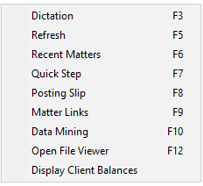
On a busy matter where the user has to scroll through several screens worth of transactions, it is sometimes a little challenging to find the white space at the bottom on which to click, but persevere and it’ll be worth it……or perhaps just print the list off and stick it on the side of your monitor! 

Whilst in Case Manager, there are several other shortcuts available which are worth highlighting as follows: 

  • Alt S to Insert a Step. Inserting a new document or action into the Case file. 
  • Alt F to insert a Freestyle Step. Inserting a non-document, non-standard item. Typically used for adding a note and or an ad hoc reminder. 
  • Alt T to take a Step. Process the highlighted action or document. 
  • Alt C to Complete a Step. Complete the highlighted action or document. The difference between Take and Complete can sometimes be confusing to users and in fact, where a step doesn’t have a follow-up action, they are in effect the same thing. However, if taking the step invokes a secondary action such as a reminder, then completing the step will mark the reminder action as having been completed and, in workflows, the next action in the process will be triggered. 

So there you go. Hopefully, there’s something in here that you didn’t know about, but would be really useful for you and your colleagues. I certainly don’t profess to know everything about P4W, so if any of you know of any other useful shortcuts available that aren’t covered above, please do share in the comments. After all, we’re here to collaborate and learn from each other so we can all get the best out of P4W.


More of a video/demo person? Watch the What The F?! A Guide To The F Key Shortcuts in P4W video below!

Case Studies
7 min read

UK law firm Maurice Turnor Gardner keeps documents safe with NetDocuments

Overview

About Maurice Turnor Gardner

Maurice Turnor Gardner is a boutique private client law firm of 45 top-tier lawyers based in London. The firm has been offering its services since 1 May 2009 following the demerger of Allen & Overy LLP’s highly-rated Private Client Department.

With a global client base of ultra-high-net-worth families, the firm seeks to understand all the legal, commercial and tax issues affecting its clients to provide them with principled and practical legal solutions, working in partnership with them as their trusted advisers. It also covers tax disputes, particularly investigations and follow on litigation with the HMRC.

Real Estate, Philanthropy and Charities and Immigration practices complement the firm’s traditional strengths in tax and estate planning and disputes relating to wealth.

A Future-Proof Platform to Improve Day-to-Day Legal Processes

Documents are at the heart of how Maurice Turnor Gardner operates. Therefore, enabling its lawyers to easily and securely access and share important files is business critical.

Like many organisations, Maurice Turnor Gardner had to quickly transition to remote working due to the pandemic. When it came to document management, the firm was using its existing practice management system (P4W) to store and manage documents. However, this made searching for and collaborating on documents difficult, especially for users who spend their working day inside of Outlook, as it took time to switch between the different applications.

In addition, the only way the firm’s lawyers could access documents remotely was via a virtual desktop. While this provided security, it also required a reliable internet connection, which wasn’t always possible on home WiFi. If a lawyer’s connection dropped, it meant they would then need to reauthenticate each time, impacting the user experience. Maurice Turnor Gardner therefore wanted to move to a true cloud platform that would provide both the security that its high-net-worth clients demand and the flexibility to support its lawyers’ remote working needs.

“We required a solution that would enable our lawyers to work from anywhere with minimal disruption,” said Richard Price, Finance and IT Manager at Maurice Turnor Gardner. “At the same time, our new DMS needed to seamlessly integrate with our existing practice management solution, which underpins our business. By moving our document management to the cloud, we would be able to benefit from enhanced levels of flexibility and security.”

Richard Price, Finance and IT Manager at Maurice Turnor Gardner

Strong APIs Make for a Quick and Seamless Implementation

NetDocuments stood out as the DMS of choice as it is built on the cloud, intuitive and enables lawyers to work seamlessly and securely within their day-to-day applications.

“From attending a number of industry events over the years, NetDocuments has always been on my radar. So, when it came to choosing a DMS, NetDocuments was top of the list as it was a true cloud platform with strong APIs,” continued Price.

NetDocuments’ implementation partner, Accesspoint Legal Services, was able to quickly build an integration with the firm’s practice management system using NetDocuments’ APIs, which meant Maurice Turnor Gardner was able to go live in only three months.

In addition, onboarding sessions were delivered to ensure all users were up and running successfully and could realise the benefits almost immediately.

“As with any IT rollout, it was crucial to ensure our lawyers were fully on board with the new systems,” said Price. “Implementing NetDocuments was the most well-received product change we have ever done. Our lawyers could immediately see how it could improve their ways of working, which was key to user adoption.”

Integrated Applications Improve Productivity

Tools like the intelligent filing function of the NetDocuments platform have enabled Maurice Turnor Gardner’s 65 users to work more efficiently, saving them time searching for and filing documents. As a result, they have been able to spend more time on higher-value work.

“NetDocuments has made the lives of our lawyers a lot easier, which means they can focus on delivering the very best client service,” added Price. “We now have a future-proof DMS which will power our business for years to come, with added peace of mind that our documents are protected with the highest level of security in the cloud.”

By utilising the integration between the firm’s practice management tool and NetDocuments, Maurice Turnor Gardner’s lawyers have been able to work in P4W, Outlook, Word and NetDocuments with one central repository for information. This has improved productivity and ensured compliance, and now there is only a single source of truth in the NetDocuments cloud. With NetDocuments CollabSpaces, Maurice Turnor Gardner is now also able to share and collaborate with clients on documents stored on NetDocuments, providing the firm with an added layer of security.

With all of its documents residing in the cloud, Maurice Turnor Gardner now has complete confidence that its lawyers can quickly and securely access the files they need from wherever they are working. In addition, the significant number of integrations NetDocuments supports means the firm can future proof its legal software stack by adopting a best-of-breed approach.  For the firm, this can only further enhance productivity and client service.

“Accesspoint’s expertise in both NetDocuments and P4W enabled us to successfully implement a document management solution that was seamlessly integrated and joined up with the core PMS and Back End processes. This ensured that the firm’s staff were fully onboard from day one.”

Hong Tran, Sales Director at Accesspoint
Higgsy's Handy Hints
6 min read

An INTERESTing Opportunity!

Overview

A trip back in time…

If you’ve been around long enough, things from the past have a habit of making a comeback. Whether it’s flared trousers, space hoppers, or Britney Spears they’ve all had their turn back in the limelight.

Back in the early 90s, one of the key selling points of the Solomon II Practice Management software which I was selling to law firms was its ability to calculate deposit interest due on client money being held. Back then, it wasn’t unusual to visit firms who had hundreds of deposit accounts set up at the bank on behalf of their clients.

Not only were these a burden to administer, but the firms were also missing out on significant sums of interest to which they were entitled.

How could you use your Practice Management Software to earn more interest for your firm?

By pooling the client money together at the bank, firms could achieve a higher rate of return for the combined pot but were only liable to pay the client the interest that they would have earned had their money been held in a separate, designated deposit account. What’s more, under the Solicitors Accounts Rules, interest was only payable to the client if the individual amount held fulfilled the specific value and time held thresholds stipulated, so that, in many cases, no interest was payable to the client, yet their money earned interest for the firm in the pooled client account.

Think about it. Even in the 90s, it wasn’t unusual for firms to be holding several million pounds worth of client money. If they only managed to attract an additional 1% on the combined monies and held £1m in client account, then they would earn an additional £10,000 per annum. This alone was often more than enough to cover the investment in their new PMS.

Where will interest rates be in 2023?

Since the 2008 financial crisis, interest rates have remained at historic lows, so the benefits of this practice have been eroded to almost nothing. As such, managing client money in this way to generate additional interest has largely been abandoned.

However, following recent events, we are now back in an era where interest rates are rising fast; with predictions that they’ll hit 6% next year. In place of the thresholds, the Accounts Rules were updated along the way to stipulate simply that the client should be paid “a fair amount of interest”; although it’s still the case that no interest needs to be paid to the client if the amount earned is under £20.

This presents law firms with a great opportunity to once again generate income from the management of client money. At a time when the costs of running the firm are only going in one direction, this will come as a welcome boost to the bottom line of legal businesses.

How can you reap the benefits of this opportunity?

Without an automated system to manage this process, firms will struggle to implement and benefit from this opportunity. The administrative burden posed in ensuring that the firm keeps up to date records of monies held on behalf of clients whilst making sure that interest is paid when due will be significant and, for some, too much to consider despite the obvious financial benefits to the business.

Know how to use the tool in P4W

The good news is that P4W has always had a Deposit Interest Calculator; enabling firms to do exactly this. Given that it’s nearly 14 years since this opportunity was effectively taken away, there will be firms who have little, if any, knowledge of how to use the tool in P4W. In fact, Accesspoint were recently contacted by a large firm using P4W to ask how they could better manage their large number of client deposit accounts now that interest rates were rising. Once they realised that P4W has this ability built in, they were delighted that the functionality was already there having been braced for some bespoke development.

So, if your firm uses P4W and could potentially benefit from using the Deposit Interest Calculator, then don’t wait a minute longer to capitalise on this “interesting” opportunity.

As for those flares, they can stay in the back of the wardrobe, but I may just nip out for a bounce on my space hopper whilst listening to Oops!…I did it again!

Richard Higgs
Non-Executive Director
Accesspoint Group Holdings

Disclaimer: Information provided above is for general guidance purposes only and should not be misconstrued as specific advice as to how client money should be handled. Each firm should always seek professional guidance before adopting any changes to current procedures.

If you would like to contact us regarding anything discussed in this article, you can email Richard or contact the team using the form below.

News
3 min read

NetDocuments Integration with PCMS

Overview

Accesspoint Announces NetDocuments Integration with law firm PCMSs.

Accesspoint is pleased to announce an exciting partnership with NetDocuments, the #1 trusted cloud platform where legal professionals do work. As an accredited NetDocuments Independent Software Vendor (ISV), Sales Referral and Implementations Partner, we can now assist firms right from the beginning of the procurement process through to implementation of NetDocuments.

“Having worked with NetDocuments on a number of our mutual client sites, we have first-hand experience of their powerful document and email management features built around a flexible and user-friendly cloud-based interface. We’ve been very impressed with the responsive ‘can do’ approach from all areas of their business; so, when the opportunity arose to partner and assist our clients in implementing a game changing product, we jumped at the chance.”

Hong Tran, Sales Manager at Accesspoint

“Customers were looking for a seamless workflow between their PCMS environment and the NetDocuments platform, and importantly a ‘single version of the truth’ so that there was no duplication of documents between the two systems and that’s what we’ve delivered,” said Tran.

With key capabilities like automated workspace creation, case agenda folders mapped to NetDocuments, and access to documents generated from existing PCMS templates, this integration makes introducing the powerful NetDocuments cloud platform simple. Accesspoint believe that this integration will provide customers with the most flexible and secure solution to file, manage and secure their documents without leaving the application they are used to working in. “Users can now benefit from the NetDocuments cutting edge email and document management functions on the move, allowing fee earners who are normally out of the office to access documents from their case file,” added Tran.

We are very excited to enter into this partnership with Accesspoint. Their deep knowledge and expertise in the legal industry brings value to our mutual customers and prospects as they continue to innovate in this space”

Reza Parsia, Vice President, Strategic Partner Management at NetDocuments

If you would like to find out more about NetDocuments or how it can work with your existing PMS system, please do get in touch with the Accesspoint team.

Mozaique
4 min read

Get one step closer to your clients and one step closer to the future!

Overview

Mozaique: our new legal platform designed to keep your firm ahead of the game

Accesspoint have recently announced the official launch of Mozaique, a new innovative legal platform designed to keep your firm ahead of the game and help your firm reach new levels of efficiency and high-quality results across every department – enabling legal intelligence.

As new software continues to enter the market at a faster pace, SME law firms are faced with the difficult task of avoiding a disjointed environment. Navigating through the wide range of software applications used across departmental teams, can sometimes prove difficult with much confusion and frustration. 

What you can expect from Mozaique 

  • Digital client onboarding
  • Secure, branded client portal
  • Intelligent automations
  • Website forms
  • Secure online client payments
  • Web payments linked into your PMS
  • Document Sharing
  • Mobile time recording
  • Web-based intranet
  • Website lead tracking
  • Analytical reports
  • PMS integration, such as P4W.
  • And much more…

Mozaique can now simplify the challenge, providing your firm with a number of benefits. 

Improved Productivity  

Achieve a higher quality of service through a more streamlined way of communication and document handling directly with your client. The Mozaique platform offers a new, automated and innovative way for your firm to stay on track, keeping up with the often-hectic work schedules experienced within SME law firms, as well as drastically reducing work time and costs overall.  

High Security  

Mozaique is the future for security within law firms. It is an effective way to reduce the risk of any cyber security threats, e.g., emails are a prime place for data breaches with communication made via email constantly being under threat of hacking, leaving your firm or your client highly vulnerable. The Mozaique platform offers your firm a safe and highly secure hub to communicate with clients and share confidential files.  

On the go Support  

Keeping your client happy is the main goal and our Mozaique platform can provide you with the right tools to achieve this. Now, you can easily answer any queries, request documents and offer ongoing and remote support to clients without having to worry about physical restrictions, as the Mozaique platform can be accessed on any device at the user’s convenience.  

Reports and Analysis  

The Mozaique platform provides handy reports and data analysis that will instantly offer your firm valuable knowledge and insights for a more productive and effective workforce. Additionally, you can create secure and informative KPI’s and general productivity or financial reports with the integration of the handy Payment Portal, as it facilitates useful monthly/annual reporting and easy editing to ensure reliable cash flow for your firm.  

This is the future for Legal IT.

Automation
5 min read

Providing your firm with easy and effective automation solutions

Overview

Keeping up with the rush of conveyancing work can be demanding, especially for SME firms who perhaps have less manpower under their belt. Resource is valuable, and this past year has taught us that investing in the right technology is essential when it comes to lessening the hassle of manual everyday work, everlasting paperwork and repetitive tasks. 

With the recent stamp duty deadline now behind us but another just around the corner, the workload for conveyancing teams is still in heavy demand. So, it might be worth exploring what the legal market has to offer to ease the pressure away from your team and consider utilising effective automation tools during this extended busy period. 

Our Sales and Purchase Screens and Workflows can ensure data accuracy around the workflow involved and inject the data straight into your PMS as well as utilise the many integrations such as Perfect Portal and InfoTrack to make your work easier and more streamlined.

Provide your firm with the perfect automation solution required to continue delivering clients with excellent service and desired outcomes. 

How can it help your firm?

‘Out of the box’ Workflows

The usual process for creating a workflow can be drawn out and the timeframe for completion can often take many months as it is commonly framed around a rigid format that requires extra work to adhere to the firm’s specific requirements which carry higher costs. Our Sale & Purchase Screens and Workflows resolve this issue with an ‘out of the box’ workflow format allowing your firm to instantly benefit from all sale and purchase conveyancing transactions. This can then be added to and developed in-line with your own in-house procedures. 

Enable Team ‘buy in’

We have seen first-hand how many firms make the fatal mistake of not including the real users of the new system at the start of the project, resulting in resistance and complaints from the team. Our system has been simplified and designed with your firm in mind to allow easy adoption. Additionally, our experienced team are always on hand to provide any extra support needed for your firm, so that you can achieve faster results whilst not compromising on the outcome for your clients. Furthermore, our effective Sale & Purchase Screens have been developed in Tikit P4W to enable an easy and smooth transition for existing users to transfer important details from one place to another quickly. 

Streamlined Integration

The Sale & Purchase Screens and Workflows facilitate the best integrations to allow a more streamlined process for you and your client. Your firm can instantly benefit from the seamless integration with Perfect Portal, so when matters are created in P4W the information from Perfect Portal is stored within the screens, this then auto populates either Oyez or Laser Forms. Additionally, the Sale and Purchase screens have been designed to work when using Infotrack so that the information is available to auto populate their forms. 

Effective Organisation

For many, working a hectic schedule whilst providing a high-quality service can often result in more stress for those who have been tasked with completing the admin work. Not only can the Sale & Purchase Screens and Workflows automate the necessary admin work involved, but they can also send prompts and reminders within a workflow to ensure that key actions or dates such as Exchange and Completion are not missed and automatically added to fee earners and central calendars if applicable, mitigating the high-risk elements of this type of work. 

Mozaique
3 min read

Introducing Mozaique the new and innovative legal platform

Overview

At Accesspoint we’ve been involved in the world of Legal IT for many years and have witnessed  many physical and emotional changes with regards to law firm attitudes. 

Our vision has been developing for some time now and sees a major shift in how we can help drive IT to much higher and more effective levels within the Legal sector. This vision sees a major shift moving away from disparate itemisation into more collective joined up solutions where they are housed and accessed via a single platform within a hosted environment.   

One of the major benefits of this is interoperability - the concept that tools or apps can interact in the platform by exchanging information or leveraging other software, services, or even hardware to better the end result and overarching experience to both client and staff alike.  

In this new environment, all options are viable and permissible, allowing each law firm to choose its own adventure or mixture of products and services to best serve its clients and staff - integrating activity streams, teams, search, documents, billing dashboards, and the interconnectivity of applications which create workflow and enhance productivity and efficiency, all in a secure cloud-based platform.

This is the future for Legal IT.

Mozaique - Enabling Legal Intelligence

Offering a wide range of some of the most innovative IT products and services created for the Legal sector in one joined up environment. Using this suite of bespoke tools will seamlessly join many activities together within a firm, providing instant dynamic data management solutions to improve the overall performance of any firm and help ease the workload burden on both individuals and departmental teams.

The central hub and catalyst for our Mozaique portfolio is the portal which offers a means of secure, effective communication and information retrieval and sharing.  

Including:

  • Secure Document Management
  • CRM
  • TaskSmart- project Management Tool
  • Promotion, Collaboration and Communication
  • KPI’s and Reporting

If you would like to contact us regarding Mozaique, you can email Hong or book a demo using the form below.

Case Studies
5 min read

Doing IT right and making an impact – Osbornes Law

Overview

Take a look at how we partnered with Osbornes Law to automate accuracy and profitability

The Group Entity Form has proven to be successful in gaining a high level of efficiency and reducing the workload within law firms. Osbornes Law has certainly been a testament to what can instantly be achieved through the integration of the innovative Group Entity Form.

Accesspoint’s team of Legal IT experts conducted P4W development work and IT Infrastructure Support

Accesspoint Legal Services and Osbornes Law began their partnership in 2014 with the like-minded goal of achieving a more seamless and sustainable workforce by utilising bespoke, intelligent, and innovative automated services and products – it was a perfect match. Recently, our Legal services team have partnered with Osbornes Law to implement a new timesaving, risk-managed and compliance led automation tool, the P4W Group Entity Creation form, which is based on Accesspoint’s game changing P4W Windows Form.

The Group Entity Creation form is one of the latest automation products that have been added to Accesspoint’s wider portfolio. It has been designed to break down group entity creation in P4W to its most simple form. Effective for both private clients and corporate/commercial entities (including integration with Companies House) it enables firms to quickly input and manage the creation of all Group Entities through a more risk managed and compliance driven process. Like many firms, Osbornes found themselves in a situation that left many staff with little to no time on their hands, as they struggled with the current group entity creation process that is available in P4W, involving creating multiple entities on numerous screens and then grouping them together. Since implementing the Group Entity Creation form, Osbornes have dramatically cut down on resources and time spent on creating multiple entities and now use the form to complete the process within one screen.

“Accesspoint’s P4W Group Entity Creation Form is the best P4W Add-On since PartnerMail. It has significantly reduced the time taken at Osbornes to create group clients and improved the accuracy of data input due to the intuitive process and user-friendly screen layout. Being able to conflict/duplicate check multiple contacts from one single screen has improved risk management in our client onboarding process, no P4W site should be without it.”

Stuart Taylor, Head of IT at Osbornes

About Osbornes Law

Established in 1973, Osbornes Law have since expanded their team to 115 lawyers and staff, and together created a long-lasting reputation for themselves built on dedication and hard work. Today they are an award-winning private client London law firm, consistently putting their clients first and working hard to maintain the strong communication and excellent bond between their team and clients. Osbornes pride themselves on their team of specialists and the quality of work they provide across a range of areas, not only within their combined expertise in family Law, personal injury, clinical negligence and more but also their commitment to stay on top of client work in a more personal manner and find effective solutions for any problem at hand.

With offices located in Camden and Hampstead, Osbornes Law are now able to complete a wide range of their work more effectively and have been recognised and celebrated with awards and mentions in the Times Best Law Firms list and The Legal 500.

If you would like to contact us regarding our Group Entity Tool, you can email Hong or book a demo using the form below.

Automation
Mozaique
3 min read

Helping You Take Care of Your Clients Best Interests – Online Will Planner

Overview

At Accesspoint, we understand that for clients, starting the journey to creating a Will can be difficult, from knowing who to trust with this delicate matter to effectively getting it done right. Additionally, for the firm, arranging meetings, gathering all of the essential information and manually inputting them into the system can be just as daunting.

Now, you can skip all of the fuss and start the process in the best way for everyone involved, with the Online Will Planner Solution.

Integrating our Online Will Planner to your website will not only ensure your firm is fully equipped with the tools needed to start planning your client’s Will remotely, but the clever automated tool can also provide a bespoke experience to your clients by giving your firm the perfect base to create any type of Will your client desires.

Allowing them to feel even more looked after and secure- which is the goal when dealing with Will planning!

What are the benefits?

Quick and Easy

The web-based Will Planner is created by legal IT experts so that your clients can complete basic personal information on a well-designed web form with no fuss.

Remotely Done

Remove the need for coming into the office, as the web forms are integrated with your firm’s site and completed remotely by clients, which will then be sent directly to your solicitor.

Customisable

Your firm can design the web form to fit your branding requirements as well as pick and choose what steps or questions should be added to your web form, providing your clients with a tailored approach.

PCMS Integrated

Enjoy the benefit of having completed web forms submitted into P4W, where it will be duplicate/conflict checked and used to auto populate wills and other letters and documents.

“Working with Accesspoint over the past 2 years has ensured a seamless approach to the major developments of P4W that we have carried out and further developments benefiting the firm, our teams and our clients. One of the biggest projects we have completed with Accesspoint was our Online Will Planner which has made the whole process of completing a simple Will online a massive success with our clients and cuts down the time lawyers spend dealing with administration work. As the firm continues to grow, we will continue to work closely with Accesspoint to ensure that we are at the forefront when it comes to technology.”

IB, Sales & Marketing Manager – GloverPriest 
Testimonials

Don't just take our word for it...

Working with Accesspoint’s website team was reassuring and easy. They kept us updated with everything that was going on from start to finish. We’re very happy with the new website. It’s clean, refreshing, and provides a great user experience with its fast speed and easy navigation.

William Rowley, HSR Law Solicitors

We’ve been really impressed with Accesspoint and Rich’s SEO support. Rich is extremely proactive in suggesting and carrying out work that genuinely helps improve our rankings, and he’s always there whenever we need advice or support. We’ve already seen great results from the work they’ve done, and it’s reassuring to know our SEO is in such capable hands. Highly recommended.

Molly Thornton, Thornton Jones Solicitors

I’ve really enjoyed working with Rich and have seen first-hand the positive impact he has had on our website. His in-depth knowledge of SEO is inspiring, and I’ve learned so much from him through our email exchanges alone! Anyone who works with Rich will gain valuable knowledge that they can then carry forward. Thank you Rich for all your hard work and support.

Paaris Kazmi, GT Stewart Solicitors

Working with Accesspoint has been an absolute pleasure. Their passion for what they do and supporting their clients is clear in every interaction. Scott, Olivia, Rich, and others are consistently approachable, and willing to go the extra mile. Our project with them was complex and highly bespoke, yet they rose to the challenge effortlessly. Thanks to them, our website and brand has seen a significant increase in visibility, engagement, and traction.

Brett Shaw, Chronicle Law

Rich has been absolutely fantastic in helping us improve our SEO efforts. He has always been proactive in optimising our pages and ensuring they perform the way we need them to. He has been great at offering valuable guidance on how to strengthen our rankings and his monthly reports have been elaborate and really useful. I’ve very rarely had to reach out to Rich. He has always actively suggested improvements and identified opportunities to ensure we stay on track.

Paaris Kazmi, GT Stewart Solicitors

The warmth and generosity of the Accesspoint team is amazing – you are a lovely bunch of people and a real pleasure to work with.

Rebecca Faulkner, Enoch Evans

Our website looks really fantastic! Well done to all of you!

We are so happy with all the social media on Goodman Ray! It’s so exciting every time I see something on there. Olivia and Emma are doing a great job and make everything so easy!

Louise Payne, Practice Manager at Goodman Ray Solicitors

I love working with Accesspoint because they are always available to help with any query big or small and have the expertise to ensure the issue is sorted.

Clifton Ingram Solicitors

What we love most about Accesspoint are the people.

Tracey Thorpe, Hunt & Coombs

Accesspoint have been so incredibly supportive in achieving desired objectives – including creation of platforms, website design and lead generation. Big thanks in particular to Olivia Fishwick and Scott Brown who continue to help make a difference for the business.

Thushara Polpitiye, Founder and Managing Director of Astute Law

Book a demo

This field is for validation purposes and should be left unchanged.