

Digital Marketing
13 min read

How to optimise your content for AI Overviews

Overview

For businesses and professionals who rely on organic search traffic, this shift matters enormously. It’s no longer enough to rank in the “ten blue links”, you now need to think about how your content is presented to, and interpreted by, AI systems.

In this article, we’ll explore:

  • Why AI Overviews matter
  • How they affect visibility and clicks
  • Simple, actionable ways to optimise your content

Why Does Optimising for AI Overviews Matter?

AI Overviews usually* appear above traditional search results. This means that if your content is referenced or quoted in the overview, it can reach users before they scroll down to the standard listings.

Did you know? According to research summarised in an article on Search Engine Land“Three-quarters of the links cited in Google AI Overview appear in position 12 or higher in the organic search results.”. What we can take from this is that traditional SEO, i.e. optimising for organic SERP placement, seems to be a contributing factor in whether you are cited in the AIO or not.

If Google’s AI chooses your page as a source, it’s a signal that your content is authoritative, reliable, and well-structured. This can strengthen your reputation in your field.

Some users may get the information they need directly from the AI Overview without clicking through to a website. While this user behaviour can reduce traffic to your website, being cited in an AI Overview still raises your brand awareness, especially if your company name or website site appears within the overview.

Did you know? In a recent Search Engine Journal article it is stated that “Google’s AI Overviews now appear for over 11% of all searches according to BrightEdge research, pulling information from multiple sources to create comprehensive answers above your organic results. Users get what they need without clicking through.”.

Search seems to be moving towards AI-powered discovery so optimising your content NOW helps ensure your content doesn’t get left behind.

How AI Overviews Work (Simply Explained)

AI Overviews are generated by large language models (LLM) which are trained on vast amounts of text. When someone searches, the AI scans Google’s index and picks content that looks:

  • Clear and easy to summarise
  • Accurate and up to date
  • Structured logically with headings and lists

Google then produces a “synthetic answer”, but it often links to the pages where it drew the information from. Your goal is to make your content the obvious choice for the AI to cite.

Practical Steps to Optimise Your Content

Here are some straightforward actions that non-specialists can take to improve their chances of being featured in AI Overviews:

  • Adopt the ‘answer first’ principle and place the answer to the question (the primary question which your web page is addressing) right at the top of your article or section.
  • Keep sentences short and easy to understand.
  • Imagine you’re writing for someone with only 30 seconds to spare.

For example: Instead of burying the answer “Section 21 is a legal process landlords use to evict tenants without fault” in paragraph four, open with that sentence and lead with the question “What is a Section 21 notice?”.

  • Break up your content into bite-sized chunks using clear headings (H2, H3, H4 etc) that reflect common search queries.
  • Use bullet points and numbered lists where possible – AI loves structured data it can quickly summarise.
  • Add short summaries at the end of long sections.

People ask Google questions in a conversational way, like “How do I optimise for AI Overviews?” rather than “AI Overview optimisation.”

  • Sprinkle in FAQ-style questions as subheadings.
  • Answer them directly underneath in one or two sentences.

Google values E-E-A-T (Experience, Expertise, Authoritativeness, Trustworthiness).

  • Add an author bio at the end of your post and be sure to link from the post to their profile and/or other articles they may have written and published.
  • Link to reputable external sources where appropriate. They key here is to only link to reputable external sources so choose wisely.
  • Keep your content up to date – review and refresh articles regularly.

Pillar and Cluster content for SEO: What it is and why it matters

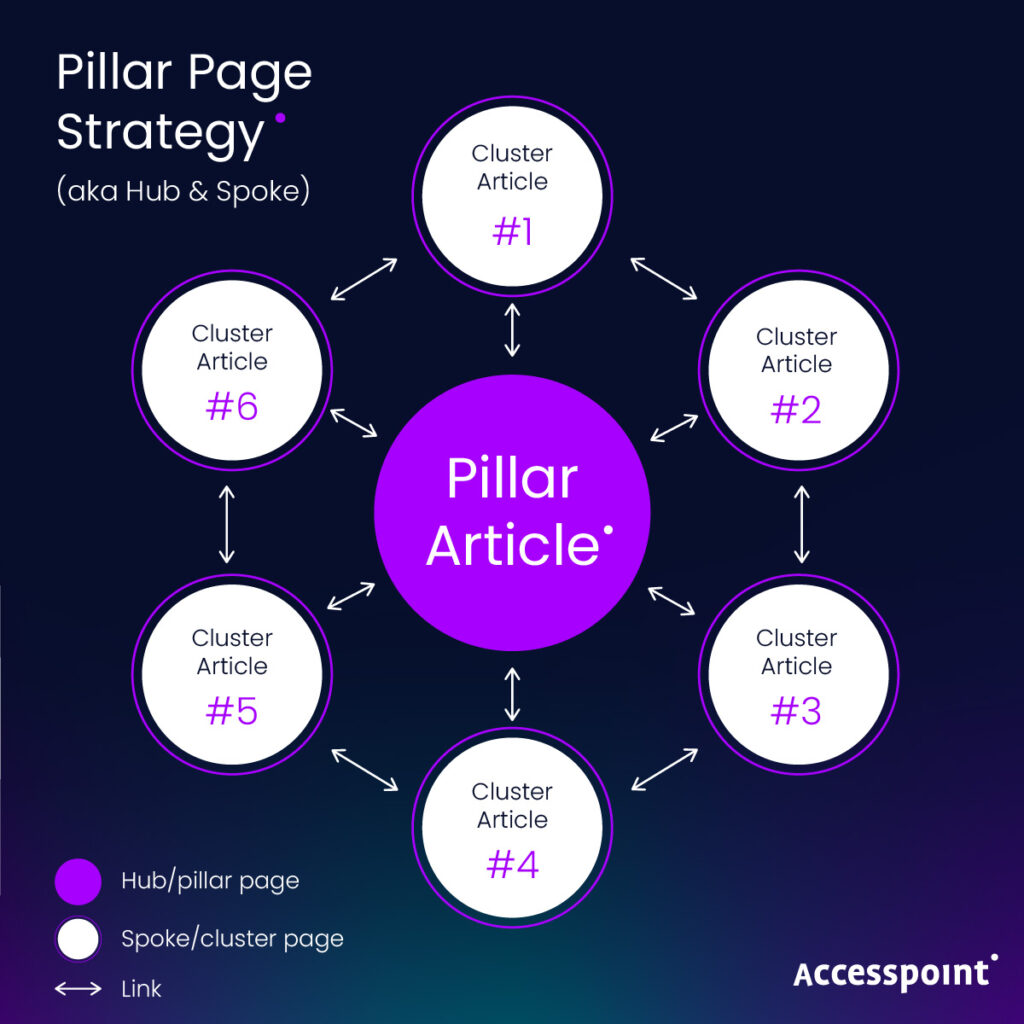
Whether you’re a legal professional, small business owner, or marketing manager, understanding and implementing this model can have a transformative impact on your organic traffic. Find out how to build E-E-A-T through Pillar and Cluster content by reading Rich‘s recent blog.

Traditional Law Firm SEO focuses on keywords, and whilst we are still focussed on ranking in the organic search results, AI Overviews favour well-explained, natural language.

  • Write like you’re explaining to a client or colleague, not just ticking boxes for search engines.
  • Avoid jargon unless your specific audience expects it. Try to stay away from using acronyms or abbreviations or use them sparingly along with the long version.

AI looks for useful, instructional content – material that goes beyond theory and actually helps the reader take action. If your article contains real-life examples, step-by-step advice, or clear takeaways, it’s much more likely to be cited in an AI Overview.

Google AI wants to serve up answers that are not only correct but also actionable. A list of abstract tips is less appealing than a clear, guided process and checklist.

For example, if you’re writing about “how can landlords serve a Section 21 notice,” you could:

  • Provide a step-by-step checklist of the documents required.
  • Show a short scenario of how a landlord might use the process in practice.
  • Highlight common mistakes to avoid, alongside best practice.

This kind of content signals to Google’s AI that your page offers practical value. It also helps real readers, who are more likely to stay on your page, share it, or remember your brand when they need professional support.

Even great content won’t be used if your site is hard to crawl.

  • Check that your pages load quickly.
  • Make sure your content is mobile-friendly.
  • Use a clear URL structure and add internal links between related posts.

For this technical element, you may need to employ the services of a specialist. However, non-specialists can get started using free tools:

  1. Google PageSpeed Insights – Provides real-time insights on page speed, mobile responsiveness, and optimisation suggestions.
  2. Ahrefs Webmaster Tools – Identifies technical SEO issues like broken links, indexing problems, and overall site health.
  3. SEO SiteCheckup – Offers a simple site audit, including checks for meta tags, headings, broken links, and other common technical SEO issues.

Using these tools, you can quickly spot problems and prioritise fixes, even without a technical background. Regular checks help ensure your content remains accessible, crawlable, and AI-ready.

Quick Checklist for AI Overview Optimisation

Using the above as an essential guide for when you are publishing new content or optimising existing content will stand you in good stead for ranking high and featuring in the AI Overviews.

To help you further, and to simplify your journey, below is a list of actions you should check off each time you write or edit website content.

Print this out and pin it up so that you can quicky refer to it every time you create or edit content.

SEO Checklist - Checklist items for writing a blog or an article.

Our Final Thoughts (and a bit about funnels)

AI Overviews are still evolving, but we think they are here to stay. Optimising for AI Overviews is about making your content more useful, clear, and authoritative for real people.

If you can answer questions concisely, structure your writing logically, and demonstrate genuine expertise, you’ll increase your chances of being highlighted by Google’s AI.

Even if AI Overviews sometimes reduce click-through rates, there’s a powerful upside: brand visibility at the very top of the search journey, also known as the Top of the Funnel (TOFU). When your content is cited in an AI Overview, your company name or website appears as a trusted source right at the start of a user’s research process.

That exposure helps you:

  • Build brand awareness with audiences who may not yet know you.
  • Establish authority by being positioned as a source Google’s AI relies on.
  • Nurture future demand – users may not click today, but they’re more likely to remember and return when they need more information, professional support, or to buy a product or service.

In other words, being cited in an AI Overview isn’t only about traffic, it’s about getting your brand in front of potential clients earlier, increasing the chances they’ll choose you when they’re ready to take action.

Optimising for AI Overviews is not an optional extra. It’s a shift in how information is discovered online. By following these simple, practical steps now, you can ensure your content continues to be found, trusted, and read – even as search transforms.

Contact Rich today – Our Law Firm SEO Expert

If you want to chat about anything in this blog or you want to discuss your law firm SEO and how Accesspoint can help, then email me today. And don’t forget to check out our client case studies below!

Digital Marketing
11 min read

Pillar and Cluster content for SEO: what it is and why it matters

Overview

If you’ve ever found yourself writing multiple blog posts around a given topic but you struggle to see real SEO results, you’re not alone. One of the most effective ways to structure your website content for both users and search engines is the Pillar and Cluster model. It’s a strategic, scalable approach to publishing new content and managing existing content that improves visibility, builds authority, and aligns closely with Google’s emphasis on E-E-A-T – That’s Experience, Expertise, Authoritativeness, and Trustworthiness. 

Whether you’re a legal professional, small business owner, or marketing manager, understanding and implementing this model can have a transformative impact on your organic traffic. 

Not sure even what SEO is? Check out my recent article where I cover briefly what SEO is, but expand further on how you can write a great blog that gets seen! 

What is Pillar and Cluster content? 

Think of your website as a book, where each core topic is a chapter and each supporting detail is a sub-section. That’s essentially what Pillar and Cluster content does for Law Firm SEO

  • Pillar Content is a comprehensive, evergreen page that broadly covers a core topic. It’s usually longer-form, offering an overview of what we might call a parent topic and answers the main questions users might have. 
  • Cluster Content consists of more focused articles that explore sub-topics in fine detail. Each of these cluster posts links back to the pillar page – and ideally, the pillar links back to them too. 

For example: 

  • Pillar: “The Complete Guide to Separation and Divorce” 
  • Clusters: “How Divorce Proceedings Work”, “Parental Responsibility Explained”, “Financial Orders After Separation”, etc. 

The beauty lies in the internal linking structure. This signals to Google that all this content is thematically connected and well-organised. Like a neatly filed cabinet instead of a messy drawer. 

Why is the  Pillar and Cluster model so valuable for SEO? 

The Pillar and Cluster model isn’t just a tidy way of organising your blog. It offers concrete Law Firm SEO benefits: 

1. Improves topical authority 

By covering a topic comprehensively, your site signals to search engines that you’re a subject matter authority – an expert! When Google sees multiple high-quality, interlinked pages around a core topic, it understands that your website is a hub of expertise. The result: it is more likely to rank well for related searches. 

2. Boosts keyword rankings 

Rather than targeting one keyword per post, this model allows you to target multiple related keywords across different posts, capturing more of the search market. You rank for a wider spread of queries while reinforcing a central topic. 

3. Enhances user experience 

Users are more likely to stay on your site when they find a clear path through your content. This means better engagement, more pageviews, and lower bounce rates. These are all really positive signals that can support SEO performance. 

4. Internal linking benefits 

Strategic internal links improve crawlability, distribute link equity, and help users discover related content. This often leads to faster indexing and more meaningful visibility in search results. 

How it supports E-E-A-T 

E-E-A-T stands for: 

  • Experience: This refers to first-hand or life experience in the subject matter. Content that reflects direct, lived experience – such as a solicitor describing their role in a complex conveyancing case – is often more insightful and relatable. Google values content that feels authentic and grounded in real-life practice. 
  • Expertise: This involves the formal knowledge or training behind the content. Are the authors qualified? Do they have the credentials or professional background to speak on the topic? For example, a blog on legal rights authored by a practising solicitor carries significantly more weight than one written by a generalist. 
  • Authoritativeness: This is about reputation — both of the individual and the website. Has the author or site been referenced or cited by others? Are they recognised within their industry? If your site consistently covers legal topics in-depth and is known for it, that bolsters its authority in the eyes of search engines. 
  • Trustworthiness: This focuses on whether the site and content can be relied on. Is the content accurate, well-referenced, and transparent about its sources? Trustworthiness also improves when you include things like editorial policies, contact information, and clear authorship. 

Google doesn’t explicitly “score” E-E-A-T, but it does reward the kind of content and structure that support it. According to Google’s Search Quality Evaluator Guidelines (2023), high-quality content demonstrates experience, expertise, authoritativeness, and trustworthiness, especially for what Google calls “Your Money or Your Life” topics like legal and health content. 

Here’s how Pillar and Cluster content aligns: 

Experience 

Cluster content gives authors a chance to showcase real-world involvement. For instance, a solicitor might share direct examples from client work, lessons learned from recent case outcomes, or commentary on changes to the law they’ve implemented in practice. This authentic, first-hand perspective helps content stand out – not only in tone but in Google’s eyes too. 

Expertise 

Expertise stems from formal education, qualifications, and domain knowledge. Through cluster posts, you can cite legislation, explain procedural steps, or debunk myths with professional clarity. By anchoring each of these in a well-researched pillar page, you demonstrate not just occasional insight but structured, consistent subject-matter mastery – a key signal for Google’s ranking systems. 

Authoritativeness 

Sites that cover topics in breadth and depth, and are structured coherently, signal authority. Think of it from the user’s perspective: who are they more likely to trust — a site with one random article on employment law, or one with a full section, clearly connected, covering every nuance of the topic? 

Trustworthiness 

The internal structure of pillar and cluster content helps reduce bounce rates and increase engagement – both are great signals to Google of good quality content. When paired with author bios, cited sources, and clear disclosure, this structure builds a genuinely trustworthy user experience. 

How do I build a Pillar and Cluster strategy? 

Here’s a step-by-step guide for implementing this model. The best part? You don’t need any technical knowledge to get started. 

1. Choose a core topic (Pillar) 

Start with a subject that’s central to your business and has enough depth to support sub-topics. This could be something rather broad like “Residential Property Law: Buying a property in the UK”. 

Your pillar should give a high-level overview of the topic, ideally targeting a high-volume but competitive keyword. 

2. Map out supporting Clusters 

Use keyword research tools (like SEMrush, Ahrefs, or even Google’s “People also ask”) to identify specific questions or themes within your pillar. Each of these should become its own post: 

  • “A First-Time Buyers Guide to Buying Your First Home” 
  • “In-Depth: What are property searches and enquiries when buying a property?” 
  • “A day in the life of a Conveyancing Solicitor” 

3. Interlink thoughtfully 

Link from the pillar to the clusters and from clusters back to the pillar. This creates a strong internal linking network that’s easy for search engines and users to follow. 

4. Refresh and expand regularly 

Google loves fresh, relevant content. As your pillar gains traction, keep adding new clusters to respond to changes in the law, new client queries, or search trends. Plus, remember to revisit your existing content to ensure it’s still relevant and to make small updates that help it remain current. 

Final thoughts 

The Pillar and Cluster approach is more than a content strategy. It’s a commitment to providing clarity, relevance, and depth in your blogs – the very qualities that align with how Google evaluates and ranks your content. It should empower you to demonstrate your authority on a given topic, strive to meet the needs of the user, and to build and future-proof your SEO strategy. 

For non-SEO professionals, this is a real practical way to bring order to your content marketing efforts. And for SEO specialists, it’s a powerful tool to scale performance without sacrificing quality. 

If you’re serious about organic growth, then pillar and cluster content isn’t just a nice to have, it’s essential. For more information on why Law Firm SEO is essential (and why you should give SEO its due attention from day one) then check out my recent article: SEO not SOS.

Contact Rich today – Our Law Firm SEO Expert

If you want to chat about anything in this blog or you want to discuss your law firm SEO and how Accesspoint can help, then email me today. And don’t forget to check out our client case studies below!

Digital Marketing
9 min read

SEO, not SOS!

Overview

Why you must invest in SEO from day one to save yourself an SOS down the line

In the fast-paced world of digital marketing, it’s essential that law firms remain active in all channels, from a glossy shop front to social media posts, there is a plethora of marketing opportunities to get your brand and services seen. 

Of course, a very common digital shop front is your website – your digital gateway to the people who will provide the services you offer. But sadly, all too often, firms believe that the creation of a website is a one-off task and only realise that something isn’t quite right when we hear the common cries for help: “Our website isn’t converting!” or “Why is our traffic dropping?” 

At that point, companies scramble to patch up the damage, scurry to treat the symptoms, and search for quick fixes. This reactionary mindset turns SEO from a proactive growth strategy into an emergency remedy. 

SEO should never be an SOS

Search Engine Optimisation (SEO) is not a rescue plan, it’s a long-term strategy that should be built into the foundation of your online presence. In this article, we’ll explore why SEO must be prioritised from day one, the costly consequences of neglecting it, and how consistent SEO investment delivers compound benefits over time. So, let’s dive in. 

What is the cost of reactive SEO? 

Many law firms treat SEO like insurance: it’s only important when something goes wrong. However, unlike insurance, SEO doesn’t offer immediate protection or a quick payout. When traffic dips, rankings slide, or conversions slow down, reactive SEO efforts often come too late.

Lost time and momentum 

Search engines don’t work overnight. Good SEO results can take 3–6 months to materialise. If you’re only optimising after a problem, you’ve already lost valuable time. Rebuilding rankings is always harder than maintaining them. 

Higher costs, lower returns 

Fixing SEO problems retroactively often requires more extensive work. Site audits, technical fixes, content overhauls, and link cleanups are required to name but a few of the tasks an SEO specialist would undertake. These come at a premium cost and, worse, you’ll be playing catch-up against competitors who invested early and consistently.

Damaged brand perception 

When your site doesn’t rank, loads slowly, or offers thin, irrelevant content, users lose trust. And in the digital world, poor user experience affects everything: your bounce rate, time on site, conversion rate, and even your search engine rankings. An SEO emergency might alert you to the issue, but by then, you’ve already lost credibility.

SEO is a long game with long-term gains 

While reactive SEO focuses on putting out fires, proactive SEO builds a strong, stable platform that supports long-term growth. Just like investing in a pension or training for a marathon, the benefits of SEO compound over time, but only if you start early and stay consistent. 

Short-term fixes might give you a temporary boost, but sustainable online visibility comes from steady, strategic effort. This section explores why playing the long game with SEO delivers far greater rewards than any quick fix ever could. 

Organic traffic is sustainable traffic 

Paid ads offer instant visibility but when you stop paying visibility stops. Organic SEO builds lasting traffic channels that continue to deliver value over time. A blog post that’s been properly optimised with the right keywords and evergreen content can generate traffic for months and even years to come. 

SEO supports the entire funnel 

Unlike PPC, which typically targets users at the bottom of the funnel, SEO can target every stage of the buyer journey – from awareness to decision-making. With a well-structured content strategy and keyword targeting plan, SEO educates, informs, and nurtures leads more naturally than any other channel. 

Compounding returns 

Every blog post, backlink, and technical optimisation adds to your site’s overall authority and performance. Over time, these actions compound. That means the more you invest now, the easier and cheaper it becomes to grow traffic and rankings in the future. 

The core pillars of proactive SEO 

If you’re serious about integrating SEO into your growth strategy, start by focusing on these key areas from the beginning: 

1. Technical SEO 

Make sure your site is fast, mobile-friendly, and properly indexed. Use tools like Google Search Console, Screaming Frog, or SEMrush to monitor crawl errors, broken links, and site architecture. 

2. On-page SEO 

Every page should be optimised for a primary keyword, with supporting semantic keywords throughout the content. Titles, meta descriptions, headings, and image alt text should all be carefully crafted. 

3. Content Strategy 

Content is still king. Regularly publishing high-quality and informative content helps establish authority, attract backlinks, and serve user intent. Use keyword research to guide what topics to cover and in what format. 

4. Link Building 

Earning backlinks from relevant, authoritative sites is still one of the strongest ranking signals. Focus on quality over quantity. 

5. User Experience (UX) and Core Web Vitals 

Google increasingly factors user experience into its rankings. A site that is easy to navigate, loads quickly, and offers value will naturally perform better in search. 

Future-proof your business with SEO 

When SEO is embedded into your business strategy from the start, you’re setting up a resilient digital foundation. You’ll be better equipped to weather algorithm updates, shifts in user behaviour, and evolving trends in search. 

Plus, SEO data offers insight beyond just Google rankings. SEO data can help you understand how users find and interact with your site, discover new opportunities through search trends, and gain insights into competitor performance and gaps. 

Don’t wait for the alarm bells 

If you’re treating SEO like a fire extinguisher, you’re doing it wrong. Great SEO isn’t about saving your site – it’s about growing it, strategically and sustainably, FROM DAY ONE! 

So, ask yourself: 

  • Are you investing in SEO with intention and consistency? 
  • Are you building for the long haul or reacting to the latest dip in traffic? 
  • Are you empowering your business to thrive organically? 

The difference between thriving and surviving online often comes down to one decision: SEO now, or SOS later. 

Final thoughts 

Search engines are how people navigate the web. If you want your brand to be found, trusted, and chosen, SEO must be a core pillar of your digital presence – not an afterthought. 

Start early, stay consistent, and let SEO work with you now, not after the damage is done.

Contact Rich today

If you want to chat about anything in this blog or you want to discuss SEO for your law firm and how Accesspoint can help, then email me today. And don’t forget to check out our client case studies below!

Digital Marketing
6 min read

How do I get my blogs seen? Five quick fixes every lawyer should know

Overview

What is SEO, and why does it matter?

SEO stands for Search Engine Optimisation, but don’t let that scare you. At its heart, SEO is simply about making your content easy to find on search engines like Google. When someone types in a question, Google scans millions (maybe even billions) of pages to find the clearest, most relevant answers.

The better your blog answers real questions, and the easier it is for the user to read, the more likely it is to show up in those search results. That’s SEO. And while the technical side of SEO is handled by specialists, the writing itself plays a huge role. In fact, great SEO often starts with great writing.

Here are five essential and easy ways to optimise your blogs to get them seen.

Five tips on how to write a great blog

These actionable tips will help make your blog both easy for the reader to engage with and better positioned for Google to display in search results.

Tip 1: Always start your blog strong

Grab the reader’s attention from the very first sentence. Avoid long, slow introductions. Get straight to the point and let readers know what they will get out of reading your blog.

Tip 2: Always use clear and concise headings

Break up your text with headings to make it easier to read. Think of headings like signposts that guide your reader through your thoughts. Keep them short and relevant. Where possible, pose your headings as questions, such as “How do I…” or “What is…”.

Tip 3: Always stick to just one main idea

Each blog should have one clear focus. If you try to cover too many topics, it can become confusing. Be clear about what you’re writing about and stay on track.

Tip 4: Always answer real questions

Think about what someone might actually type into Google to find your content. Your blog should aim to answer a real-life question. Alongside your clear headings, your response should be direct and useful. No waffle.

Tip 5: Always link to something useful

If you mention a topic you’ve written about before, say so, and include a note like “See our blog on…”. This helps readers explore a subject more deeply. You should also look for opportunities to link to trusted external sources, such as a professional body, a regulator, or a relevant news article.

Final Thoughts

Great writing deserves to be seen. When your blog is clear, focused, and genuinely helpful, you’ve already done the hard part. But by applying a few simple SEO-friendly habits, like using strong headings, sticking to one idea, and answering real questions, you turn good writing into content that gets discovered.

You don’t need to be an expert to make an impact. Write with purpose, keep the reader in mind, and your blogs won’t just be published, they’ll be found.

It’s just the tip of the SEO iceberg

What you’ve just read is only the tip of the SEO iceberg. To truly boost your blog’s visibility, there are dozens more tweaks that can make a real difference. From adding images with descriptive alt text, to using powerful keywords, and crafting the perfect meta titles and descriptions, each small improvement helps nudge your content further up the search results.

Want to find out more about SEO?

If you’d like to discover how we can help you with your SEO then get in touch with Accesspoint today.

Or contact Rich directly to have chat about your SEO needs.

Higgsy's Handy Hints
18 min read

Do I really need a Document Management Solution?

Overview

As law firms grow and evolve, managing documents and workflows becomes increasingly complex. Many firms find that their current case management systems simply can’t keep up with modern demands for scalability, security, and integration. This is where a dedicated Document Management System (DMS) integrated with your Practice and Case Management System (PCMS) can make all the difference.

Go back 10 years and selecting a new practice and case management system (PCMS) was a fairly straightforward process. Numerous suppliers were offering a complete practice & case management system which did pretty much what any mid-sized law firm needed; and some. For most firms back then, it was usually a case of out with the old and in with the new, but in the main, what they were implementing was an updated version of the system they were replacing; sometimes even from the same supplier. 

The larger law firms in the Top 100, were doing things rather differently. They had an approach known as “Best of Breed”. This meant they would be running multiple systems catering for different requirements across the firm. Having IT teams larger than most mid-sized law firms enabled them to present a seamless experience to the end users, but a lot of their time was taken building integrations in the background to support the user experience and ensure a single data repository; although this latter challenge wasn’t always successfully achieved. 

Nowadays, the best of breed approach is becoming much more commonplace in mid-sized law firms too. There are several reasons for this as follows: 

  1. Modern solutions have open APIs; enabling much easier integrations with other applications and minimal; if any, need for these to be managed by the law firm. 
  1. The spectrum of requirements looking to be addressed by firms has widened significantly meaning that a typical, one size fits all, PCMS is no longer capable of satisfying all of these. 
  1. Firms have realised that different solutions address different requirements across the firm and thus best satisfy user demands. A single PCMS will undoubtedly mean some compromises as it can’t possibly address the specifics of all the differing requirements of a modern law firm. 
  1. Firms who are not yet ready to change their PCMS but want to introduce business-specific applications to support their users’ requirements will naturally create a best of breed environment. This is something we fully endorse and assist our clients with at Accesspoint. Not only does such an approach address those business-specific requirements, it also creates a user environment which relies much less on the core PCMS; thus minimising any disruption to the majority of users when the PCMS is eventually swapped out. 

During the last decade, one of the trends that started to emerge amongst mid-sized law firms was the adoption of a dedicated Document Management Solution alongside their existing PCMS. Typically, the firms adopting a DMS were offering commercial work types which lend themselves much more to a DMS than a Case Management system (CMS).  

Lawyers would argue (not always justifiably perhaps!) that their type of work doesn’t conform to a process which can be handled by a workflow. They would also cite the volume and frequency of email generated in these transactions as being a major challenge given that a CMS generally lends itself to filing emails one at a time. Their most common complaint about a CMS was that they wanted to work within MS Office and not have to go separately to the CMS to do stuff. 

In response, some CMS vendors added functionality which had previously been exclusively available in a DMS. Version control, improved email filing, and being able to save documents directly from Word into the CMS certainly helped for a time, but once again, the PCMS was always going to offer compromises unlike a dedicated DMS which is 100% focused on what the lawyers need for managing documents. 

For those firms who had adopted DMS back in the day, there was generally one choice; iManage. (Ok there were others out there, but iManage was the Microsoft of the DM world back then.) The problem for any mid-sized law firm who wanted to implement the iManage solution was the sheer amount of infrastructure and associated cost required to run the solution; never mind the cost of the software itself and the onboarding. 

By the time NetDocuments entered the UK market, it had already established itself as a trusted document management solution for law firms across the US for over a decade. With its innovative, cloud-native platform, NetDocuments offered robust functionality and a cost-effective, scalable approach to document management. Its arrival in the UK brought a unique advantage for mid-market firms: a fully cloud-native solution that delivered powerful features without the need for expensive infrastructure, making it an attractive and affordable choice for firms looking to optimise their document management systems. 

At Tikit, we were offering NetDocuments to our clients and prospects; both in large law and the mid-market.  

In large law, sales took off fairly quickly; whether that was to a greenfield site or to a firm looking to swap out of their existing DMS. These firms were familiar with DM solutions and already knew the benefits they provided to their users, even if they were adopting a solution for the first time.  

At the time, NetDocuments offered a real USP compared to other DMSs. NetDocuments is the only truly cloud-native document management system – unlike other solutions that may only be ‘cloud-enabled,’ NetDocuments offers unmatched scalability, flexibility, and security. 

Despite this, sales into mid-sized law firms were very different. Tikit even created a dedicated sales role to talk to clients about the NetDocuments solution, but that didn’t make a material difference.  

Firstly, the mid-sized law firm market was generally much less familiar with document management and invariably the question being asked was, “Why do we need a DMS when we’ve got a CMS?” 

Secondly, at the time, there was no integration available between NetDocuments and the PCMS and firms were rightly concerned that they’d end up with two document stores; thus increasing the overhead in managing risk and compliance. 

Fast forward to today, and the landscape has changed dramatically. 

The adoption of NetDocuments among growing law firms has surged, thanks to the seamless integration between DMS and PCMS. This integration offers a single source of truth, enabling firms to manage all documents in one secure, cloud-based system. 

A common misconception is that ‘all-in-one’ systems are more cost-effective than integrating a dedicated DMS with a PCMS. In reality, best-in-breed solutions like NetDocuments, when integrated with your PCMS, offer superior functionality, scalability, and user experience—often with a lower total cost of ownership over time. 

The adoption of NetDocuments among mid-sized law firms has really accelerated, with most firms now at least considering the benefits of a DMS when evaluating a new PCMS. 

The reasons for this are severalfold: 

  1. Seamless integration with the PCMS now enhances the user experience and enables a single source of the truth across the business; i.e. one copy of a document in one location; whether it’s been created in the DMS or the PCMS. 
  1. The adoption of a Cloud First strategy by law firms has accelerated their interest. In addition, the Accesspoint integration with their PCMS enables all of their documents; including those previously and subsequently created in the PCMS to be stored in the highly-secure NetDocuments’ Cloud. This not only serves to fulfil their strategy, but also removes a significant risk issue for the firm. 
  1. Some mid-market firms have come to realise that the years of development they put into creating intricate workflows in their CMS were mostly wasted, with users generally finding work arounds to suit the real-world practicalities of running their cases. Frankly, if your firm isn’t doing highly process-driven work such as conveyancing or PI, then the potential benefits of workflow-driven case management are negligible. Many years of account managing hundreds of firms showed me that those who had purchased their new PCMS with all the good intentions of creating workflows throughout the practice had often given up; frustrated by the inevitable disconnect with the end users and the long delays between the ideas being agreed for the workflow and its implementation; by which time, things have moved on and the workflow was doomed from the off. (Clearly, there are firms who run very successfully with in-house case management workflows, but I’d hazard a guess that they are less than 10% of all firms and even that maybe pushing it).

    That’s not to say there isn’t a place for CMS in mid-sized firms; there most definitely is. Rather than building end to end workflows that are trying to cover every eventuality in a case type, it’s far more productive and in tune with end users to build mini workflows covering elements of the case such as file opening and closing plus events along the way wherein the same set of documents is always generated. Outside of these workflowed elements, users can select the document or action most appropriate to the circumstances; thus providing a much more flexible solution likely to see a much higher rate of adoption which ironically takes much less time to create and maintain. That’s what I’d call a win-win! For some firms though; even this is more than they need in practice and so, for them, a DMS is the ideal solution. 
  1. Mid-sized firms are now much more aware of what a DMS can offer and can take a more informed view as to whether a CMS is sufficient or they need the additional functionality provided by a dedicated DMS. 

Just in the last couple of months, Accesspoint has worked with two firms to implement NetDocuments. Both had selected a new PCMS, but following implementation, had realised that the native DM functionality was not sufficient to satisfy their lawyers’ needs.  

Whilst, both firms have now achieved their desired solution, how can you ensure that your firm avoids such a potentially disruptive and more expensive route to your required solution? 

Firstly, it’s important to ask the users what they need and then create a list of requirements before even embarking on the procurement process. Ideally, separate these out to identify the “must haves” and the “nice to haves”. This will then provide a checklist for the assessment of those systems you are considering for your new solution. You can read more details about this process and the whole journey for the selection of your new PCMS by downloading a copy of my previous blog post below.

An e-booklet by Richard Higgs.

It’s also important to understand the key differences in document management functionality between a PCMS and a dedicated DMS. The summary table below highlights those functions better-served by a PCMS or a DMS. 

Remember, the below table is highlighting which solution handles the stated functionality better as indicated in green. Functions highlighted in red are those generally not provided within that solution. However, those functions not highlighted in red or green are available in that solution, but are better handled by the other. 

There are, of course, integrations with 3rd party apps provided by both DMS and CMS suppliers to help plug some of the functionality gaps, however, this introduces additional complexity and costs; whilst never being able to offer the same slick user experience available within a single application. 

For a more in-depth analysis of the document management functionality comparison between a PCMS and a DMS, please click here.  

The need for a PCMS within a mid-sized law firm is a given.  

Ultimately, the decision isn’t about choosing between a PCMS and a DMS; it’s about recognising the significant value that adding a DMS alongside your PCMS can bring. By integrating both, your firm can enhance its workflow, streamline document management, and improve user experience across the board. 

If you find that adding DMS functionality alongside your PCMS offers substantial value—either immediately or as your firm scales—then the good news is that the seamless integration now available means you’ll be able to provide a unified solution that meets all of your firm’s document management and practice needs. 

On the other hand, if you determine that a DMS offers all the document and email functionality your firm requires, you can still implement the practice management features of your PCMS, leaving out the case management elements. For some PCMS solutions, this could result in licence cost savings, but more importantly, it will reduce implementation time and ensure the solution delivers exactly what users need from the outset. 

And for firms that aren’t ready to change their PCMS but have already recognised the need for a DMS, implementing that solution now will help you clarify what’s truly required in a future PCMS when the time comes to make the switch. 

Whatever your firm’s situation, if you need expert advice or hands-on guidance throughout the procurement process or the implementation of your solution, Accesspoint Legal Services is here to help.

Legal Aid
9 min read

Breaking the mould of Legal Tech

Overview

Product discovery insights from Accesspoint Legal

Market insights

Legal Tech challenges of 2025 are vastly different from those that shaped the development of much of today’s software. Despite this, law firms seeking to upgrade their technology often default to like-for-like replacements, swapping one Practice Management System (PMS) for another. However, the modern tech stack is evolving into a collection of best-in-breed applications, each designed to solve specific problems with outstanding efficiency.   

Amongst all Legal Tech applications, time recording, cost management, and billing are the most critical to a law firm’s profitability. However, for many SME law firms, these operations have not evolved as quickly as other areas, such as client onboarding. The urgency bias of recent years, driven by the pandemic and the deep integration of billing systems within legacy PMS platforms has contributed to this lag.

Product insights

Legal Aid lawyers operate under intense financial pressure, they manage the highest cost and billing overheads in legal services yet receive the lowest fee income. A Law Society survey revealed that 50% of the cost to run a Legal Aid case are unrecoverable, exposing a systemic challenge. Accesspoint are building software to solve that challenge. Throughout our discovery phase we examined the root causes behind inefficiencies, identifying gaps in matter setup, time recording, funding management, and collaboration that prevent lawyers from being paid what a case is worth.

Our findings reinforce an urgent need for specialised matter cost management, time capture and billing tools. It is an unknown path for an SME law firm to navigate, this article explores our key learnings and lays out a blueprint for next-generation Legal Aid SaaS solutions.

Key Learnings from Product Discovery

We started our exploration with costs written off, either known and captured through accounts or offline at billing and asked ourselves why? All paths led us back to the start of the matter, where most billing errors originate. At thematter set up stage fee earners inadvertently miss the opportunity to consider enhancements or apply incorrect funding arrangements. When the case progresses, amendments are not made. Mistakes in setting up the correct tracking led to underbilling, often without lawyers realising it until a Cost draftsperson highlights what could have been!

Current Problem:

Matter setup in PMS relies on extensive manual knowledge of complex fee structures, rates, and Legal Aid Agency (LAA) rules. Even with conditional logic and automation in PMS, incorrect configurations at the outset lead to compounding financial losses. When observing incorrect matter set up, fee earners questioned replied “I knew it was wrong, but not how to put it right”!

Solution

A guided matter journey that ensures fee earners assign the right funding structure, cost categories, and recoverable fees from the beginning. Intuitive user experiences identifying clear optionality with validations anticipating and correcting common errors, while coaching lawyers to consider guidance that could justify enhancements of up to 100% right from the start.

We learned that time recording remains a universal pain point for Legal Aid and private funded B2C/B2B transactions alike. Whilst time recording apps are used widely, they fail to enhance usability so that lawyers still struggle to record time correctly and contemporaneously. Without accurate time, fixed fees and WIP are incorrect and attempts at manage costs ineffective, leaving WIP to be calculated with manual manipulation and adjustment at the billing stage.

Current Problem:

Lawyers risk losing recoverable time because time recording tools don’t prevent misallocation. Many systems treat time capture as a passive data entry task rather than an intelligent billing assistant.

Increasing cost limits at the billing stage to account for missed time is nearly always impossible. If time is mis-recorded, whether under the wrong scope, matter, or omitted entirely, it is typically written off. And if a claim is submitted incorrectly, the process of recovering and resubmitting those costs can be both time-consuming and complex.

Solution:

Smart time capture tools that:

  • Provide real-time validation against LAA rates and fees
  • Differentiate the different scope and levels of a matter to prevent mis-posting
  • Enable time to be deleted, re-allocated or moved where necessary
  • Offer simple, intuitive interfaces significantly reducing errors

Legal Aid cost control and billing is notoriously complex, spanning different contract types (criminal, civil, family), each with its own funding rules. One matter can have multiple levels and fixed fees running concurrently. Many existing software solutions passively accept data input without validating if it aligns with funding criteria.

Current Problem:

Lawyers struggle to manage matter costs effectively because they often lack clear visibility into what a case is worth, both at each individual funding level and in aggregate across scopes and limits. This lack of insight leads to lost revenue, as firms fail to anticipate the need for cost limit or scope extensions before incurring costs.

Solution:

Matter cost monitor: A simple source of truth for consolidated matter costs that:

  • Manages costs against budget with both WIP and anticipated costs budgeted
  • Associates the correct funding scheme based on matter type
  • Displays all funding and WIP in an intuitive dashboard with calls to action
  • Alerts lawyers when funding thresholds are likely to be reached, enabling them to submit proactive applications for cost increases, creating tasks and tracking completion

Cost budgeting and billing requires input not just from individual lawyers but also from finance teams, external counsel, and lawyers. Without dedicated collaboration tools, billing communications happen via email chains, spreadsheets, annotated reports and disconnected databases, increasing the risk of lost or duplicated information.

Current Problem:

Key stakeholders (fee earners, accounts teams, internal and external billers) lack a shared space to collaborate on case billing. This leads to ineffective communication, billing delays, billing insight gaps and inaccurate or disputed claims.

Solution:
  • A centralised billing workspace where all stakeholders can review costs, leave notes, share tasks and flag issues in real time
  • A billing tracker that tracks WIP all the way through the billing process, from draft to payment for all claims across all departments.
  • Insight updates identifying trends in good and bad practice, WIP lock up and benchmarks for internal stakeholders comparable to the market.
  • Integration with existing PMS to ensure seamless transition between casework and billing

Conclusion: breaking the mould to innovate

The discovery phase reinforced a clear reality: Legal Aid lawyers are systematically underpaid due to outdated technology and inefficient processes. The current Tech landscape often forces practitioners to fit their workflows into generic PMS tools, instead of providing purpose-built solutions that align with Legal Aid’s unique complexity.

By rethinking matter setup, time recording, funding management, and collaboration, we are designing a system that removes barriers to making a profit. This isn’t just about improving billing, it’s about providing Legal Aid practices with a route to financial sustainability. As we move forward, we stay committed to one goal:

Delivering precise, intelligent software that enables lawyers to do the work, get paid and build a practice where Legal Aid has a future.

Whether you want to be first in line to benefit from our Legal Aid Manager, or need some advice on how to formulate your plans for a best in bread tech stack, contact us for advice, support or just a catch up!

Accounting
3 min read

One for the accountants in the room 

Overview

When law firms adopt new software, is the finance team considered?

When law firms adopt new software, the focus is often on efficiency for fee earners, support staff, and cost savings. But what about the finance team?

Too often, they’re expected to adapt to whatever system is chosen without consideration for their specific needs. If you’ve ever felt this frustration, you’re not alone. 

One of the most frequently asked questions when talking to client firms about a possible move is: “Can Actionstep replace my current legal accounting system?” The answer is a resounding yes!

Streamlined Accounting 

Actionstep streamlines the approach to legal accounting. Putting the user experience at the heart of the processes. Almost all the actions a fee earner or cashier would need are accessed on one single menu, reducing time spent searching for screens or functions. 

Full Bank Reconciliation in One Place 

One of the key features finance users love is that Actionstep allows you to manage both client and office banks directly within the system. You get full reconciliation facilities, along with the option to import electronic statements seamlessly making month-end processes faster and more accurate. 

Improved Credit Control 

If cash flow management is a priority, Actionstep has built-in features to help you improve credit control. The ability to email bills and statements with just a few clicks streamlines the billing process. There’s no need for additional configuration or add-ins, making it an out-of-the-box solution that keeps things simple. 

Comprehensive Reporting Made Easy 

Finance teams thrive on reports and Actionstep has them abundance. Whether you need them for month-end close or daily tracking, Actionstep makes the process user-friendly. Key benefits include: 

  • Favourite Reports: Mark frequently-used reports for quick access, eliminating the need to search through menus. 
  • Saved Configurations: Reduce repetitive data entry by saving custom report settings for future use. 
  • Clear & Detailed Insights: Gain full financial oversight with detailed, easy-to-understand reports. 
  • Custom Reports: Use the intuitive report builder to satisfy those additional analysis needs. 

Intrigued?

If you’ve been hesitant about transitioning to a new system because of finance functionality concerns, now is the time to take a closer look at Actionstep. It has everything finance teams need to stay efficient, compliant, and in control of their processes. 

Feel free to get in touch with Hayley to learn more about how Accesspoint can help you. 

Legal Aid
11 min read

The 2025 Legal Services Rethink

Overview

Why, what and how to get started?

As we step into 2025, the legal industry stands at a pivotal juncture—a phoenix moment for law firms that calls for a comprehensive reset. It is not enough to focus on putting together an AI adoption plan or consolidating the legal tech/application stack. We are talking about a rethink of what comes next for how Legal Services are practiced.

Bridging the worlds of law firm strategy and product development, I have witnessed 18 months of intense innovation across the market. Software suppliers racing to harness AI and law firms levelling up their tech adoption roadmap.

Unlike the digital transformation challenge of the pandemic, we don’t have the urgency bias of business continuity, instead a transformation catalyst that goes to the heart of how law is practiced. AI presents opportunities, challenge and risk that cannot be met by tendering for new software and rethinking operational practices alone. Most importantly the future of how law is practiced, should not be left to software providers alone to define the solution. 2025 is an opportunity for a reset that sparks invention by law firms that have deep client and market knowledge essential to creating human (rather than AI) centric solutions.

Vision and Strategy

Rethinking must begin by re-evaluating core vision and strategy. In a market so frothy with investment into AI applications to deliver B2C direct services, this involves a deep dive into market and client insights to understand the problems that need to be solved.

Firms should ask themselves:

What do clients genuinely require of us based on how they can and will access AI before they reach our doors”, and “how can these needs shape the core strategic direction of our practice?”

This introspection is crucial for aligning services with client expectations and market demands. As consumers, AI empowers us to do less to know more across all areas of our personal and professional lives. Law firms that reinvent their services to compliment the new demands of consumers are likely to be out in front.

A reset enables firms to test ROI expected on current strategic projects that improve the efficiently of how current legal services are delivered not just today but tomorrow.

If what we do changes, it follows that how we do it needs to change. The tactical delivery of current strategy underway: to streamline service delivery, to rethink pricing, to renew brand or marketing maybe even to enter new markets, may no longer align with the vision post reset.  The 2025 reset requires firms to rethink the “what” not just the “how” and define the vision that earns them a place in the new Legal Services marketplace.

Practical steps:

  1. Run a product services workshop that creates a map of: The problems your clients need you to solve, mapping out the tools your client has at their disposal.
  2. Have fun designing how you would deliver your services to meet those needs, in a manner that will delight your clients, be ambitious and bold!
  3. Draft a vision for a practice that provides the solutions you identified.
  4. Test your current strategy and if it does not deliver directly against the vision, change it.

Technology as an Enabler

When I describe a phoenix moment for law firms, I conjure up a vision of a majestic red bird taking flight out of the ashes of legacy tech and antiquated practices, which have long been on fire. A bit dramatic perhaps and just to be clear I am not suggesting setting the practice on fire!


Without doubt the larger and older the practice, the harder it is to change, leaving super agile new entrants to the market without any fire to put out, no data and software debts to solve, with a freedom to invent new ways to practice.  But a greenfield is not without challenges and so transforming a practice building on an existing client base, brand trust, huge data and market insights is a pretty strong foundation. This takes us to our next rethink, the opportunity to build an ecosystem to deliver against the vision reset.

Technology can be a huge enabler here rather than being viewed as an operational burden, shouldered by the IT team. From the creation of data lakes and workflows to maximise the integration of AI, SaaS solutions that provide beautiful user experience, intelligent document/case management and exceptional client experience portals, the world is your oyster in how your tech can deliver against your vision. Designing the roadmap for what and when and how can be as liberating and fun as the vision piece, (yes, I did say fun you can test me on this!).

Practical steps:

  1. Workshop what your ideal tech ecosystem will deliver, not being constrained by your current tech stack or workflows, remember we are future proofing a design that delivers against vision, not tactical iterative adaption where possible. Not sure where to get started?collaborate with an expert technology partner who can fill any gaps and add context.
  2. Focus on the problems to solve not the solutions, there are too many tender documents that are a tick box exercise of transferring current practice to a new application.
  3. Score the problems from most important to least important to solve. Is it a true enabler to your practice vision?
  4. Draft a technology plan with a roadmap which is as agile as possible. Every part of your design should solve a to clear problem statement. If you are tendering for a new CMS why? Why does a new CMS deliver against your new strategic vision? Whatever you do, rethink what is required and use your experience to shape a new solution.
  5. Identify low hanging fruit – Legal tech roadmaps can be notoriously long and waterfall in delivery, 18 months of work at a time before any value is delivered and the ROI too far into the future, what can you do to change that?

Talent Development: Thriving in a New Landscape

If you want to succeed with your reset, developing talent to thrive amidst new challenges and opportunities is a cornerstone of the legal reset. This involves continuous learning and adaptation, equipping legal professionals with the skills needed to navigate the complexities of AI and technology.

Practical training can bring the fun back to new skills such as AI prompt workshops and hackathons to build prompt libraries in a collaborative environment.

By fostering an environment of growth and innovation, firms can ensure their teams are prepared to meet future challenges head-on.

Investing in a team that embodies trust, collaboration, and autonomy is essential. Distributed leadership across the practice should be encouraged, allowing team members to thrive at problem-solving and contribute to the firm’s vision and the delivery of strategy against it. This approach not only fosters a culture of innovation but also ensures that the strategic direction is informed by diverse perspectives and expertise.

Practical steps:

  1. No committees please, ideate with all members of your team. User groups, departmental workshops, whatever your style is, get your team closest to your client’s and the market informing your vision and strategy. Brining in expert people transformation consultants can be a game changer here.
  2. The people who put their hands up first with the loudest voices are not always the most informed. Investing in the voice of your business will reap the quickest returns who isn’t heard that needs to be?
  3. Don’t let vision and strategy become a top-down command, keep your team invested throughout your planning and delivery process. Give them opportunities to update on what is working, what is not and new ideas.
  4. If you must change your strategy, communicate why, showing that accepting failure with the ability to pivot is the sign of a strong business.
  5. Celebrate every single success you can think of! From the workshop completion to the tactical delivery of project milestones which your team contributed to. Make this the reset thought out and delivered by your entire business as stakeholders.

A Straight Line from Vision to Roadmap

The 2025 legal reset is about redefining vision and strategy. It is an exciting opportunity to remove the urgency bias of recent years that has driven transformation projects.  Leveraging technology as an enabler and nurturing talent, the legal industry can evolve to better serve clients and thrive in a rapidly changing world. This reset is not just necessary; it is imperative for the sustainability and success of human centred legal services in the years to come.

Let’s chat about rethinking your vision, strategy or roadmap for Legal Services.

News
4 min read

We won the NetDocuments EMEA Partner of the Year Award!

Overview

Accesspoint recognised for Award-Winning Partnership with NetDocuments

NetDocuments, the world’s #1 trusted cloud platform where legal professionals do their best work, announced the winners of the 2024 Partner Awards as part its annual Inspire 2024 conference. The Awards recognise NetDocuments partners for their ability to deliver extraordinary value to NetDocuments customers via innovative technology integrations, platform implementations, user training, and technology adoption across all regions and business segments.

Scott Brown and Hong Tran were delighted to receive the NetDocuments EMEA Partner of the Year Award on behalf of Accesspoint

This prestigious award celebrates our world class implementations, continuous growth, excellent customer feedback and impressive bespoke integration development skills. Since becoming a Partner 2 years ago, Accesspoint’s continued investment in its dedicated team has contributed to significant success; culminating in the implementation of the NetDocuments solution for thousands of users this year.

Our Managing Director, Scott Brown, comments:

“Winning this prestigious award highlights the devotion and commitment of our incredibly-talented team. For Accesspoint to receive this recognition amongst the distinguished NetDocuments Partner community is testament to the implementation expertise and success we have achieved in a relatively short time.”

“The NetDocuments partner ecosystem is essential to the success of our customers and our collective ability to deliver enduring value to the legal community. Our partners work tirelessly to ensure our mutual customers are able to maximise their technology investments, deliver better service, and continually innovate. This relentless commitment to the success of our customers is what our ‘Partners of the Year’ winners prove on a daily basis.” – Reza Parsia, VP, Strategic Partnerships, NetDocuments

We’re Accesspoint: the legal technology specialists, providing innovative products, services and IT advice for law firms. Our clients come to us for our expertise and innovation, then stay with us because we’re a can do company with the personal touch.

We understand the importance of accelerating your firm’s ability to overcome business challenges; as well as the importance of ‘getting it right’ so you can meet the increasing demands of your ever-changing environment, colleagues, and clients. We provide bespoke solutions using market-leading technologies to create packages which generate efficiencies, help you understand and promote your business more effectively, and enable you to deliver the best client experience.

NetDocuments is the intelligent document management system that helps legal professionals do their best work. Backed by 25 years of experience in cloud innovation, NetDocuments offers a complete end-to-end platform for document and email organisation and management, including award-winning automation and AI capabilities; robust security, collaboration, and search technologies; seamless integrations with other tools professionals use daily; and a suite of large language model AI-powered solutions with the security and guardrails to manage AI responsibly. NetDocuments supports over 7,000+ law firms, corporate legal departments, and public sector entities globally.

Learn more about NetDocuments. 

Testimonials

Don't just take our word for it...

Working with Nesar has been a positive experience for our website. His technical expertise, proactive approach and attention to detail ensure that our site runs smoothly at all times. He is always quick to resolve issues, implement improvements, and offer practical solutions that enhance user experience. Nesar is a pleasure to work with, and I am impressed with his communication and client service skills.

Hayley Leslie, TV Edwards

Working with Accesspoint’s website team was reassuring and easy. They kept us updated with everything that was going on from start to finish. We’re very happy with the new website. It’s clean, refreshing, and provides a great user experience with its fast speed and easy navigation.

William Rowley, HSR Law Solicitors

We’ve been really impressed with Accesspoint and Rich’s SEO support. Rich is extremely proactive in suggesting and carrying out work that genuinely helps improve our rankings, and he’s always there whenever we need advice or support. We’ve already seen great results from the work they’ve done, and it’s reassuring to know our SEO is in such capable hands. Highly recommended.

Molly Thornton, Thornton Jones Solicitors

I’ve really enjoyed working with Rich and have seen first-hand the positive impact he has had on our website. His in-depth knowledge of SEO is inspiring, and I’ve learned so much from him through our email exchanges alone! Anyone who works with Rich will gain valuable knowledge that they can then carry forward. Thank you Rich for all your hard work and support.

Paaris Kazmi, GT Stewart Solicitors

Working with Accesspoint has been an absolute pleasure. Their passion for what they do and supporting their clients is clear in every interaction. Scott, Olivia, Rich, and others are consistently approachable, and willing to go the extra mile. Our project with them was complex and highly bespoke, yet they rose to the challenge effortlessly. Thanks to them, our website and brand has seen a significant increase in visibility, engagement, and traction.

Brett Shaw, Chronicle Law

Rich has been absolutely fantastic in helping us improve our SEO efforts. He has always been proactive in optimising our pages and ensuring they perform the way we need them to. He has been great at offering valuable guidance on how to strengthen our rankings and his monthly reports have been elaborate and really useful. I’ve very rarely had to reach out to Rich. He has always actively suggested improvements and identified opportunities to ensure we stay on track.

Paaris Kazmi, GT Stewart Solicitors

The warmth and generosity of the Accesspoint team is amazing – you are a lovely bunch of people and a real pleasure to work with.

Rebecca Faulkner, Enoch Evans

Our website looks really fantastic! Well done to all of you!

We are so happy with all the social media on Goodman Ray! It’s so exciting every time I see something on there. Olivia and Emma are doing a great job and make everything so easy!

Louise Payne, Practice Manager at Goodman Ray Solicitors

I love working with Accesspoint because they are always available to help with any query big or small and have the expertise to ensure the issue is sorted.

Clifton Ingram Solicitors

What we love most about Accesspoint are the people.

Tracey Thorpe, Hunt & Coombs

Accesspoint have been so incredibly supportive in achieving desired objectives – including creation of platforms, website design and lead generation. Big thanks in particular to Olivia Fishwick and Scott Brown who continue to help make a difference for the business.

Thushara Polpitiye, Founder and Managing Director of Astute Law

Book a demo

This field is for validation purposes and should be left unchanged.